
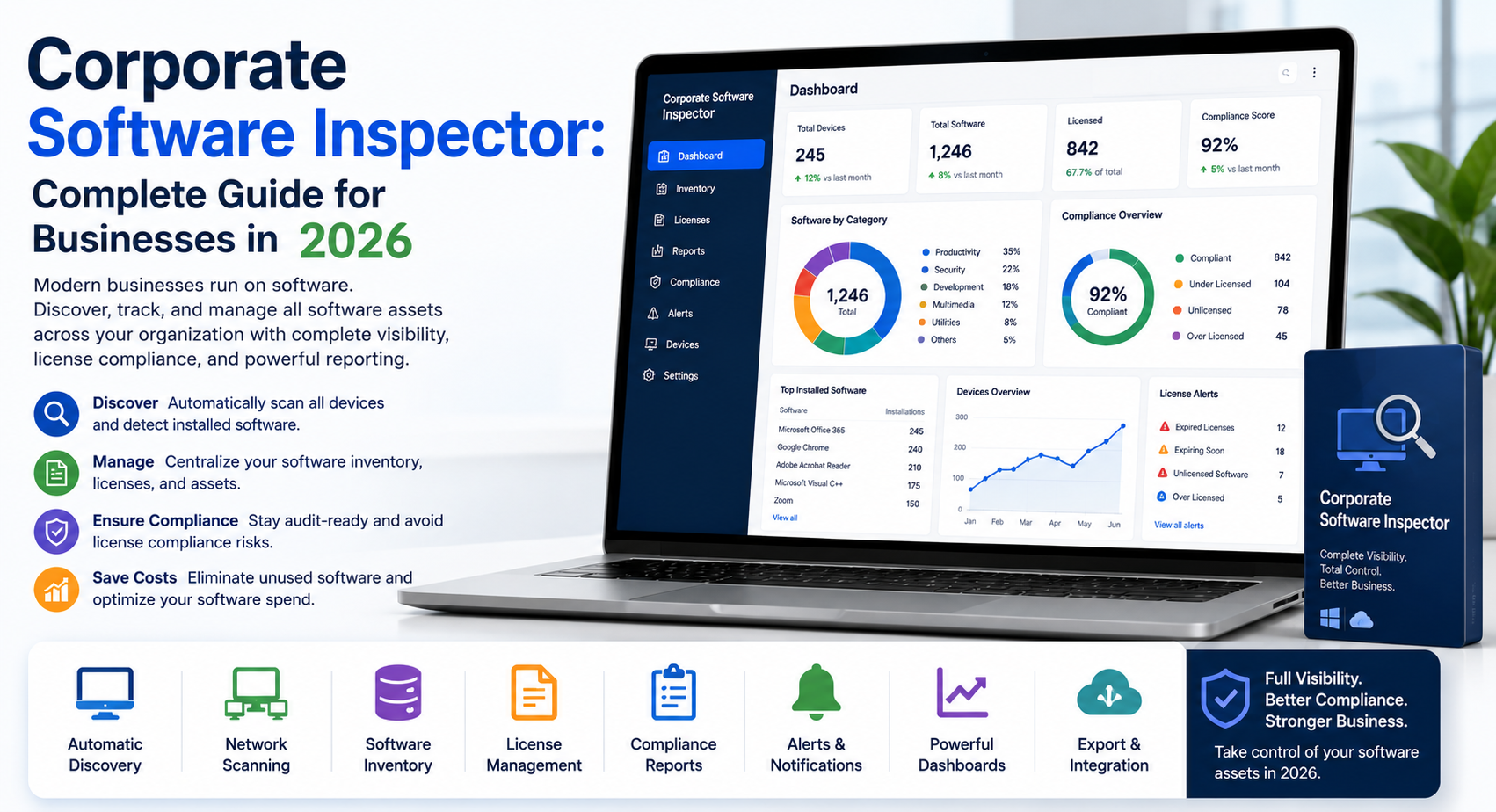
Corporate Software Inspector: Complete Guide for Businesses in 2026
Modern businesses run on software. Teams use dozens of applications every day for communication, accounting, customer support, analytics, cybersecurity, and remote work. But many organizations still struggle to track what software employees install and use.
That creates serious problems.
Outdated applications increase cybersecurity risks. Unused subscriptions waste money. Unapproved software creates compliance issues. And missing software visibility makes IT management harder than it should be.
This is where a corporate software inspector becomes valuable.
A corporate software inspector helps organizations monitor, analyze, audit, and secure enterprise software environments. It gives IT teams better visibility into applications, vulnerabilities, licenses, and security risks across the company.
For businesses in the United States, software inspection has become a critical part of cybersecurity and IT governance in 2026.
In this guide, you’ll learn how corporate software inspection works, why businesses need it, which tools lead the market, and how companies can improve security and compliance through better software visibility.
What Is a Corporate Software Inspector?
A corporate software inspector is a software management and vulnerability monitoring solution designed for businesses and enterprise environments.
Its main purpose is simple: help organizations identify, track, secure, and manage software installed across systems and devices.
The term became widely known through Flexera’s Secunia-based vulnerability management platform. Today, businesses also use the phrase more broadly for enterprise software inventory and inspection tools.
A corporate software inspector usually performs these functions:
- Detects installed software
- Identifies outdated applications
- Monitors vulnerabilities
- Tracks software licenses
- Flags unauthorized applications
- Supports patch management
- Generates compliance reports
Think of it like an IT security checkpoint.
Instead of checking passports, it checks software versions, vulnerabilities, and license usage.
Without software inspection, businesses often lose visibility into their IT environments. Employees install random browser extensions, unapproved AI tools, or outdated applications that create security risks.
And unfortunately, hackers love outdated software almost as much as employees love ignoring update notifications.
Definition of Corporate Software Inspector
A corporate software inspector combines software asset management, vulnerability assessment, and compliance monitoring into one centralized system.
It helps businesses answer important questions like:
- Which applications are installed?
- Are applications up to date?
- Which systems contain vulnerabilities?
- Are licenses compliant?
- Is unauthorized software running inside the network?
These answers help organizations reduce operational and cybersecurity risks.
Why Businesses Use Software Inspection Tools
Businesses use software inspection tools because managing software manually no longer works.
A mid-sized company may use hundreds of applications across laptops, cloud systems, mobile devices, and remote environments.
Without automation, IT teams struggle to maintain visibility and security.
Corporate software inspectors simplify this process through centralized monitoring and automated reporting.
Difference Between Software Inspection and Antivirus
Many people confuse software inspection tools with antivirus software, but they serve different purposes.
Antivirus software focuses mainly on malware detection and threat prevention.
Corporate software inspectors focus on:
- Software inventory
- Patch management
- Vulnerability visibility
- License compliance
- Enterprise software governance
Antivirus tools stop known threats. Software inspection tools help prevent vulnerabilities before attackers exploit them.
Why Corporate Software Inspection Matters in 2026
Software environments have become more complex than ever.
Remote work, cloud adoption, SaaS tools, and AI-powered applications continue to increase across industries. That growth creates visibility and security challenges for businesses.
Rising Cybersecurity Threats
Cybercriminals actively target outdated software.
Applications with unpatched vulnerabilities often become easy entry points for ransomware attacks, phishing campaigns, and data breaches.
Even one outdated browser plugin can create serious risks.
Corporate software inspectors help organizations identify vulnerable applications quickly so IT teams can deploy updates before attackers exploit weaknesses.
According to cybersecurity guidance from CISA, timely patching and vulnerability management remain essential parts of enterprise security.
Software License Compliance Challenges
Software vendors now audit businesses more aggressively.
Companies that exceed license limits may face penalties, legal disputes, or unexpected costs.
Software inspection tools help businesses track:
- Active licenses
- Subscription usage
- Expiration dates
- Duplicate installations
This visibility helps organizations maintain compliance while reducing unnecessary spending.
The Growing Problem of Shadow IT
Employees often install applications without IT approval.
This issue is known as Shadow IT.
Examples include:
- Unauthorized AI writing tools
- File-sharing apps
- Browser extensions
- Personal productivity software
Shadow IT creates security and compliance risks because organizations lose visibility into how employees handle business data.
Corporate software inspectors help discover and manage unauthorized applications before they become major problems.
Cost Control and Software Waste Reduction
Many businesses pay for software nobody uses.
Unused SaaS subscriptions, duplicate applications, and inactive licenses quietly drain IT budgets every month.
Software inspection tools help organizations identify waste and optimize software spending.
That’s especially important for enterprises managing hundreds of cloud subscriptions.
How Corporate Software Inspector Works
Most enterprise-grade software inspection platforms follow a similar process.
Software Discovery and Inventory
The first step involves software discovery.
The system scans devices, servers, cloud environments, and endpoints to create a complete inventory of installed applications.
This may include:
- Desktop applications
- SaaS tools
- Browser extensions
- Operating systems
- Open-source components
Automated discovery saves IT teams from relying on outdated spreadsheets or manual audits.
Vulnerability Scanning Process
Once software gets identified, the platform compares application versions against vulnerability databases.
If the system detects outdated or insecure software, it immediately flags the issue.
For example:
- Unsupported Java versions
- Outdated Adobe Reader installations
- Vulnerable browser plugins
- Expired software components
This process helps businesses reduce exposure to known threats.
Risk Prioritization and Threat Detection
Not every vulnerability carries the same level of risk.
Modern software inspection tools prioritize threats based on factors like:
- Severity score
- Exploit availability
- System importance
- Exposure level
This allows IT teams to focus on high-priority risks first.
Automated Patch Management
Many platforms integrate with enterprise patch management systems.
These integrations help IT teams deploy updates automatically across devices and networks.
Automation improves efficiency while reducing human error.
Because let’s be honest — nobody wants to manually update 3,000 employee laptops on a Friday evening.
Compliance Reporting and Audit Support
Corporate software inspectors also simplify compliance reporting.
Organizations can generate reports for standards such as:
- HIPAA
- PCI DSS
- SOC 2
- ISO 27001
These reports help businesses prepare for audits and demonstrate security best practices.
Key Features of Corporate Software Inspector Tools
Different platforms offer different capabilities, but most enterprise software inspection solutions include core features.
Real-Time Software Monitoring
Modern tools continuously monitor software environments instead of relying on periodic scans.
This gives IT teams better visibility into changes across systems.
Centralized Dashboard Management
Administrators can manage software environments from one interface.
Dashboards typically display:
- Vulnerabilities
- Missing patches
- Installed applications
- License usage
- Compliance alerts
Software License Tracking
License tracking helps organizations avoid overuse, underuse, and unnecessary renewals.
It also improves budgeting and procurement planning.
Third-Party Application Updates
Many businesses focus only on operating system updates while ignoring third-party applications.
Corporate software inspectors help patch software like:
- Browsers
- PDF readers
- Collaboration tools
- Media players
Endpoint Visibility Across Networks
Modern workplaces include remote devices, hybrid environments, and cloud systems.
Software inspection tools help maintain visibility across distributed networks.
Automated Security Alerts
Most platforms send alerts when they detect:
- Critical vulnerabilities
- Unauthorized software
- Missing patches
- Compliance violations
This allows IT teams to respond quickly.
Top Benefits of Using Corporate Software Inspector
Organizations invest in software inspection tools because the benefits go beyond cybersecurity.
Improved Enterprise Security
The biggest benefit is stronger security visibility.
Businesses can identify vulnerabilities faster and reduce exposure to cyberattacks.
Better Software Visibility
Companies gain a complete view of their software environments.
This improves operational efficiency and IT governance.
Reduced Compliance Risks
Software inspection simplifies compliance reporting and audit preparation.
That reduces legal and regulatory risks.
Faster IT Operations
Automation reduces manual workload for IT teams.
This improves response times and operational efficiency.
Lower Software Costs
Organizations can eliminate unused licenses and duplicate applications.
That leads to significant long-term savings.
Stronger Regulatory Compliance
Industries with strict regulations benefit from centralized reporting and vulnerability tracking.
This matters especially in healthcare, finance, and government sectors.
Best Corporate Software Inspector Solutions
Several enterprise platforms dominate the software inspection market.
Flexera Corporate Software Inspector
Flexera remains one of the best-known providers in vulnerability intelligence and software asset management.
Its solutions focus heavily on vulnerability monitoring and software visibility.
ServiceNow Software Asset Management
ServiceNow provides enterprise-grade software asset management integrated with IT service workflows.
Ivanti Endpoint and Patch Management
Ivanti combines endpoint management, vulnerability assessment, and patch deployment into one platform.
Snow Software Asset Intelligence
Snow Software focuses on software visibility, SaaS optimization, and license management.
ManageEngine AssetExplorer
ManageEngine offers cost-effective IT asset management and software inventory solutions for mid-sized businesses.
Corporate Software Inspector vs Traditional IT Asset Management
Many businesses assume software inspection and IT asset management are identical.
They overlap, but they serve different purposes.
Key Differences
Traditional IT asset management focuses mainly on inventory and procurement.
Corporate software inspection focuses more heavily on security, vulnerabilities, compliance, and patch management.
Security-Focused vs Inventory-Focused Tools
Asset management tracks what businesses own.
Software inspection analyzes whether those applications create risks.
Which Solution Businesses Need Most
Most enterprises benefit from using both systems together.
Combining visibility, compliance, and security creates stronger IT governance overall.
Final Thoughts
Corporate software inspection has become essential for modern businesses.
Organizations now manage thousands of applications across cloud systems, hybrid environments, and remote devices. Without proper visibility, cybersecurity and compliance risks grow quickly.
A strong software inspection strategy helps businesses:
- Improve cybersecurity
- Reduce software waste
- Track vulnerabilities
- Simplify audits
- Maintain compliance
- Optimize software spending
For U.S. companies in 2026, software visibility is no longer optional.
Because businesses cannot secure what they cannot see.
18 Comments