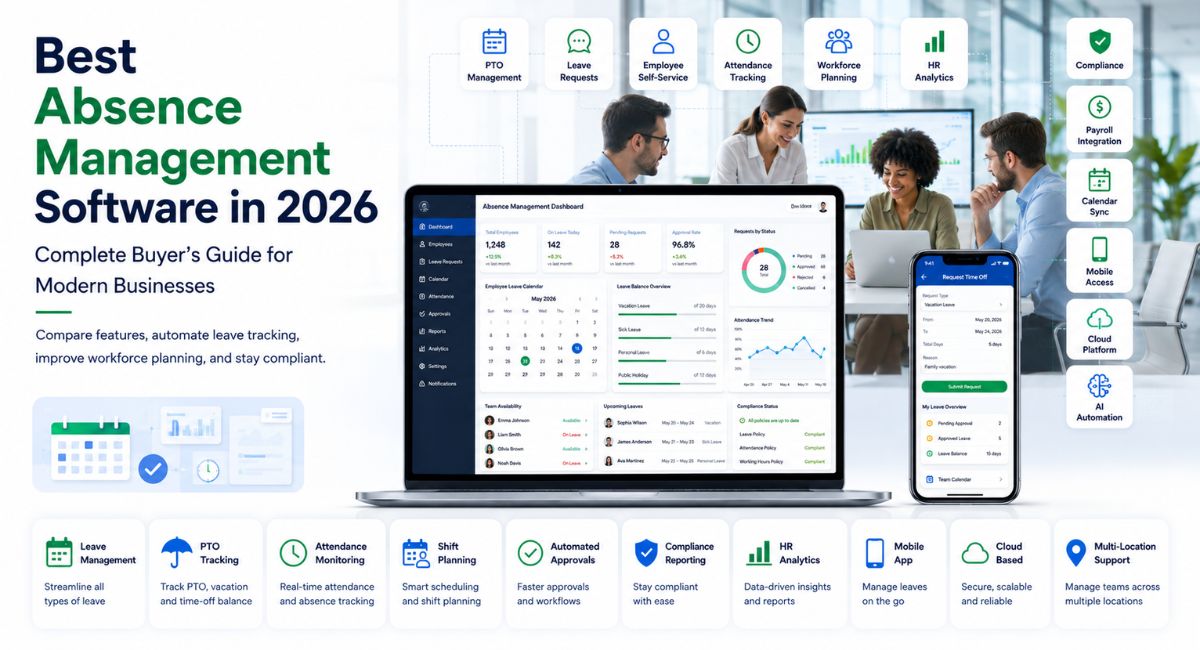
Best Absence Management Software in 2026: Complete Buyer’s Guide for Modern Businesses
Employee absences are a normal part of running any business. Vacation requests, sick leave, parental leave, jury duty, medical appointments, and unexpected emergencies all affect workforce availability. The challenge isn’t that employees take time off—it’s managing those absences fairly, accurately, and without disrupting daily operations.
Many organizations still rely on spreadsheets, paper forms, email chains, or manual calendars to track employee leave. As teams grow, these methods become difficult to manage. HR departments spend more time approving requests, managers struggle to maintain staffing levels, and payroll errors become more common.
That’s where absence management software comes in.
Modern absence management platforms automate leave tracking, simplify approval workflows, improve compliance, and provide managers with real-time visibility into workforce availability. Many solutions also include absence and substitute management software capabilities, allowing organizations—especially schools, healthcare providers, and large employers—to quickly arrange qualified replacement staff when employees are unavailable.
In this guide, you’ll learn:
- What absence management software is
- Why businesses are investing in automated leave management
- The benefits for HR teams, managers, and employees
- Essential features to look for
- How to choose the right software for your organization
- Common implementation challenges and how to avoid them
Whether you’re a small business owner, HR manager, school administrator, or enterprise decision-maker in the United States, this guide will help you understand what today’s absence management solutions can offer.
What Is Absence Management Software?
Absence management software is a digital system that helps organizations track, manage, approve, and report employee leave from a single platform. Instead of manually updating spreadsheets or handling requests through email, employees submit leave requests online, while managers review and approve them using automated workflows.
The software records different types of absences, including:
- Paid time off (PTO)
- Vacation leave
- Sick leave
- Personal leave
- Family and medical leave
- Bereavement leave
- Military leave
- Jury duty
- Remote work requests (where applicable)
- Unplanned absences
Most modern platforms integrate with payroll, HR information systems (HRIS), scheduling software, and time-tracking tools, reducing duplicate data entry and improving accuracy.
What Is Absence and Substitute Management Software?
While standard absence management software focuses on tracking leave, absence and substitute management software goes a step further by helping organizations find replacement staff when employees are unavailable.
This functionality is especially valuable for industries where staffing shortages directly affect operations, such as:
- K–12 schools and school districts
- Colleges and universities
- Healthcare organizations
- Manufacturing facilities
- Hospitality businesses
- Retail chains
- Public sector organizations
For example, when a teacher reports sick, substitute management software can automatically notify available substitute teachers based on qualifications, availability, and location, reducing administrative work and minimizing classroom disruption.
Why Absence Management Matters More Than Ever
Today’s workforce is more flexible than ever before. Hybrid work, remote teams, flexible schedules, and evolving labor regulations have changed how organizations manage employee availability.
Without a structured absence management process, businesses often experience:
- Scheduling conflicts
- Payroll inaccuracies
- Increased administrative workload
- Compliance risks
- Reduced productivity
- Employee dissatisfaction
- Unexpected staffing shortages
These issues become even more challenging for organizations with multiple locations or hundreds of employees.
Automating absence management helps create consistent processes while giving employees greater transparency into their available leave balances and request status.
Benefits of Absence Management Software
Organizations invest in absence management software for more than convenience. A well-designed system supports workforce planning, improves employee experience, and reduces administrative burden.
Saves Time for HR Teams
Manual leave tracking consumes valuable HR resources. Staff often spend hours updating spreadsheets, responding to emails, correcting errors, and reconciling payroll data.
Automation reduces repetitive tasks by:
- Tracking leave balances automatically
- Routing approval requests
- Sending reminders
- Updating calendars
- Generating reports
This allows HR professionals to focus on strategic initiatives rather than administrative work.
Improves Workforce Planning
Managers need to know who is available before assigning work.
Real-time absence calendars help teams:
- Prevent understaffing
- Avoid overlapping vacations
- Plan seasonal workloads
- Schedule projects more effectively
For organizations with shift-based operations, visibility into upcoming absences can significantly improve scheduling decisions.
Enhances Employee Experience
Employees appreciate a transparent leave process.
Instead of emailing HR or waiting for updates, they can:
- Check leave balances
- Submit requests online
- View approval status
- Access leave history
- Receive automatic notifications
Self-service capabilities reduce confusion and improve trust in company policies.
Reduces Payroll Errors
Leave data often affects payroll calculations.
Accurate integration between absence management software and payroll systems helps reduce:
- Incorrect PTO balances
- Overpayments
- Missed deductions
- Manual corrections
This improves financial accuracy while reducing payroll processing time.
Supports Compliance
Organizations in the United States must comply with federal, state, and local leave regulations.
Depending on the employer and location, this may include:
- Family and Medical Leave Act (FMLA)
- Americans with Disabilities Act (ADA)
- State-specific paid leave laws
- Company leave policies
- Union agreements
Good software helps maintain accurate records, approval histories, and audit trails that support compliance efforts.
Essential Features to Look For
Not every absence management platform offers the same capabilities. Choosing software with the right features depends on your organization’s size, industry, and workforce structure.
Centralized Leave Management
A centralized dashboard should allow HR teams to manage all employee absences in one place.
Look for:
- Leave balances
- Approval history
- Team calendars
- Employee records
- Policy settings
This eliminates scattered spreadsheets and disconnected systems.
Automated Approval Workflows
Instead of relying on manual emails, automated workflows route leave requests to the appropriate manager based on predefined rules.
Benefits include:
- Faster approvals
- Consistent decision-making
- Reduced administrative work
- Automatic reminders
Employee Self-Service Portal
Employees should be able to:
- Request leave
- Check remaining PTO
- Upload documentation if required
- Track approvals
- View company leave policies
A user-friendly portal improves adoption and reduces HR inquiries.
Mobile Accessibility
Many employees work outside traditional office environments.
Mobile apps allow staff and managers to:
- Submit leave requests
- Approve absences
- Receive notifications
- Check schedules
- View calendars
This flexibility is especially valuable for distributed and field-based teams.
Calendar Integration
Shared calendars help managers understand workforce availability at a glance.
Integrations with Outlook, Google Calendar, or Microsoft Teams reduce scheduling conflicts.
Custom Leave Policies
Organizations often have unique policies for:
- PTO accrual
- Carryover rules
- Half-day leave
- Seniority benefits
- Department-specific allowances
Flexible policy configuration reduces manual adjustments.
Reporting and Analytics
Good reporting tools help HR leaders identify trends such as:
- High absenteeism rates
- Seasonal leave patterns
- Department workloads
- Overtime caused by absences
- Leave utilization
These insights support better workforce planning and budgeting.
Payroll and HRIS Integration
Integration prevents duplicate data entry and improves consistency across systems.
Popular integrations may include:
- Payroll software
- HR information systems
- Workforce management platforms
- Scheduling tools
- Identity management systems
Which Industries Benefit Most?
Almost every organization manages employee leave, but some industries rely particularly heavily on automated absence tracking.
Education
Schools often need both leave tracking and substitute placement.
Absence and substitute management software can automatically notify qualified substitute teachers, helping schools fill vacancies quickly while reducing administrative work.
Healthcare
Hospitals and clinics operate around the clock, making staffing critical. Automated scheduling and absence tracking help ensure patient care isn’t disrupted by unexpected employee absences.
Manufacturing
Production facilities depend on maintaining adequate staffing levels. Real-time absence visibility supports shift planning and reduces production delays.
Retail
Retail businesses often experience fluctuating staffing needs during holidays and seasonal promotions. Leave management software helps managers balance employee availability with customer demand.
Professional Services
Consulting firms, accounting practices, and legal offices benefit from better resource planning by knowing which employees are available for client projects.
How to Choose the Right Absence Management Software
Selecting software involves more than comparing feature lists. The right solution should align with your business processes, workforce size, and long-term goals.
Before evaluating vendors, consider the following questions:
How Large Is Your Workforce?
Some platforms are designed for small businesses with fewer than 100 employees, while others support global enterprises with thousands of users.
Choose software that can scale as your organization grows.
Do You Need Substitute Management?
If your organization frequently replaces absent employees—such as schools, healthcare facilities, or shift-based businesses—look for solutions that include built-in substitute scheduling and automated replacement workflows.
Will It Integrate With Existing Systems?
Integration is essential for reducing manual work. Make sure the platform connects with your payroll software, HRIS, scheduling tools, and communication platforms.
Is It Easy to Use?
Even the most powerful software won’t deliver value if employees avoid using it. During product demonstrations or free trials, evaluate how intuitive the interface is for both employees and managers.
Internal Linking Opportunity: Link to a related guide such as Workforce Management Software, HR Software for Small Businesses, Employee Scheduling Software, or Payroll Software Comparison.
Best Absence Management Software in 2026
The best absence management software depends on your organization’s size, industry, budget, and operational requirements. While no single platform is ideal for every business, several solutions consistently perform well across usability, automation, compliance, and integration capabilities.
Below are some of the most recognized options available in 2026.
1. UKG Pro Workforce Management
Best for: Large and enterprise organizations
UKG offers a comprehensive workforce management platform that combines absence tracking, scheduling, payroll, and workforce analytics. Its advanced automation and reporting tools make it well suited for organizations with complex staffing requirements.
Key strengths:
- Automated leave management
- Workforce forecasting
- Compliance tools
- Employee self-service
- Advanced reporting
2. Workday
Best for: Mid-sized and enterprise businesses
Workday combines HR, payroll, finance, and workforce planning into a single cloud platform. Its absence management features allow organizations to configure complex leave policies while maintaining accurate records.
Key strengths:
- Flexible leave rules
- Mobile access
- HR and payroll integration
- Workforce analytics
3. BambooHR
Best for: Small and growing businesses
BambooHR is known for its clean interface and ease of use. It offers leave tracking, PTO management, employee records, and onboarding within one platform.
Key strengths:
- Simple implementation
- User-friendly interface
- PTO tracking
- Employee self-service
4. ADP Workforce Now
Best for: Businesses using ADP payroll
Organizations already using ADP can benefit from built-in leave tracking and payroll synchronization, reducing manual work across HR processes.
Key strengths:
- Payroll integration
- Compliance support
- Automated workflows
- Mobile application
5. Frontline Absence & Substitute Management
Best for: K–12 schools and educational institutions
Frontline is one of the most widely used solutions in education. It combines absence tracking with automated substitute placement, helping schools quickly fill vacancies while reducing administrative effort.
Key strengths:
- Automated substitute matching
- Teacher absence tracking
- School scheduling tools
- District-wide reporting
How Much Does Absence Management Software Cost?
Pricing varies significantly depending on the software provider, deployment model, and required features.
Common pricing factors include:
- Number of employees
- Number of administrators
- Cloud or on-premises deployment
- Payroll integration
- Reporting capabilities
- Mobile applications
- Customer support level
- Custom workflows
Typical pricing ranges are:
| Organization Size | Estimated Monthly Cost |
| Small business (10–100 employees) | $50–$300 |
| Mid-sized business | $300–$1,500 |
| Enterprise | Custom pricing |
Some vendors charge per employee per month (PEPM), while others offer custom enterprise agreements.
When evaluating costs, consider the total cost of ownership, including implementation, training, integrations, and ongoing support—not just the subscription fee.
Best Practices for a Successful Implementation
Implementing new HR software affects managers, employees, payroll teams, and IT departments. A structured rollout helps maximize adoption and minimize disruption.
Review Existing Leave Policies
Before configuring the software, document your current leave policies and identify inconsistencies. Standardizing policies first reduces confusion during implementation.
Clean Existing Data
Importing inaccurate employee records can create long-term problems. Review leave balances, employee information, and historical records before migration.
Involve Key Stakeholders
Successful projects typically include representatives from:
- Human Resources
- Payroll
- IT
- Department managers
- Executive leadership
Gathering feedback early helps ensure the software supports real operational needs.
Train Employees and Managers
Even intuitive software benefits from training. Provide simple guides, video tutorials, or live demonstrations so employees understand how to request leave and managers know how to approve requests.
Monitor Performance After Launch
After implementation, track key metrics such as:
- Leave request processing time
- Approval turnaround
- HR administrative workload
- Employee adoption rates
- Payroll accuracy
These insights help identify opportunities for further improvement.
Common Mistakes to Avoid
Organizations often focus on features while overlooking practical implementation challenges.
Here are some common mistakes to avoid.
Choosing Software Based Only on Price
The least expensive option may lack essential features, integrations, or support. Consider long-term value rather than initial cost alone.
Ignoring User Experience
If employees find the system confusing, adoption rates may suffer. Prioritize software with a clean interface and straightforward workflows.
Overlooking Compliance Requirements
Businesses operating across multiple U.S. states may need to comply with different leave regulations. Choose software that supports configurable policies and accurate recordkeeping.
Skipping Integration Planning
Disconnected systems increase manual work and the risk of errors. Confirm compatibility with your payroll, HRIS, scheduling, and communication tools before purchasing.
Failing to Plan for Growth
Your workforce may expand over time. Select software that can scale with your organization without requiring a complete replacement in a few years.
Future Trends in Absence Management Software
The workplace continues to evolve, and absence management software is becoming more intelligent and proactive.
Artificial Intelligence
AI is increasingly used to:
- Detect absence patterns
- Forecast staffing shortages
- Recommend scheduling adjustments
- Automate routine HR tasks
Predictive Workforce Planning
Advanced analytics help managers anticipate busy periods, seasonal leave trends, and staffing gaps before they become operational issues.
Greater Employee Self-Service
Employees increasingly expect mobile-first experiences, including instant leave requests, real-time balance updates, and automated notifications.
Unified Workforce Platforms
Many organizations are replacing standalone leave tracking systems with integrated workforce management platforms that combine scheduling, payroll, HR, attendance, and analytics.
Enhanced Compliance Automation
As labor regulations continue to evolve across the United States, software vendors are expanding tools that help employers configure leave policies, maintain audit trails, and generate compliance reports.
Frequently Asked Questions
What is absence management software?
Absence management software is a digital solution that helps businesses track employee leave, automate approval workflows, manage leave balances, and improve workforce planning.
What is absence and substitute management software?
Absence and substitute management software combines leave tracking with tools that automatically identify and schedule replacement staff when employees are unavailable. It is commonly used in education, healthcare, and shift-based industries.
Is absence management software suitable for small businesses?
Yes. Many providers offer affordable cloud-based solutions designed specifically for small businesses, with features such as PTO tracking, approval workflows, and employee self-service portals.
Does absence management software integrate with payroll?
Most modern platforms integrate with payroll, HRIS, and time-tracking systems. These integrations reduce manual data entry and help improve payroll accuracy.
How do I choose the best absence management software?
Start by evaluating your workforce size, industry requirements, existing HR systems, compliance needs, reporting requirements, and budget. Shortlist vendors that provide strong integrations, intuitive interfaces, and reliable customer support.
May you like: Corporate Software Inspector: Complete Guide for Businesses in 2026
Conclusion
Managing employee leave shouldn’t require endless spreadsheets, email chains, or manual calculations. The right absence management software helps organizations automate routine tasks, improve workforce visibility, reduce payroll errors, and create a more transparent experience for employees and managers alike.
If your organization also needs to replace absent employees quickly, investing in absence and substitute management software can further streamline operations and minimize disruption—particularly in education, healthcare, manufacturing, and other staffing-intensive industries.
When comparing solutions, look beyond feature lists. Consider ease of use, scalability, integration capabilities, security, reporting, and ongoing support. A platform that aligns with your current workflows and future growth plans will deliver greater long-term value than one chosen solely on price.
Next Step: Before making a final decision, create a shortlist of vendors, request live demonstrations, involve HR and department managers in the evaluation process, and compare each solution against your organization’s operational goals. You may also find it helpful to explore related resources on workforce management software, employee scheduling software, HRIS platforms, or payroll software to build a fully integrated HR technology ecosystem.