HR Analytics Software: Complete Guide to Choosing the Best HR Analytics Platform in 2026
Human resources teams have access to more workforce data than ever before. Payroll systems, applicant tracking platforms, performance reviews, time records, surveys, benefits systems, and employee engagement tools can all produce valuable information.
The problem is that having data is not the same as being able to use it.
HR leaders may know that turnover is increasing, hiring is taking longer, or overtime costs are rising—but still struggle to determine why those changes are happening or where management should act first.
That is where HR analytics software becomes useful.
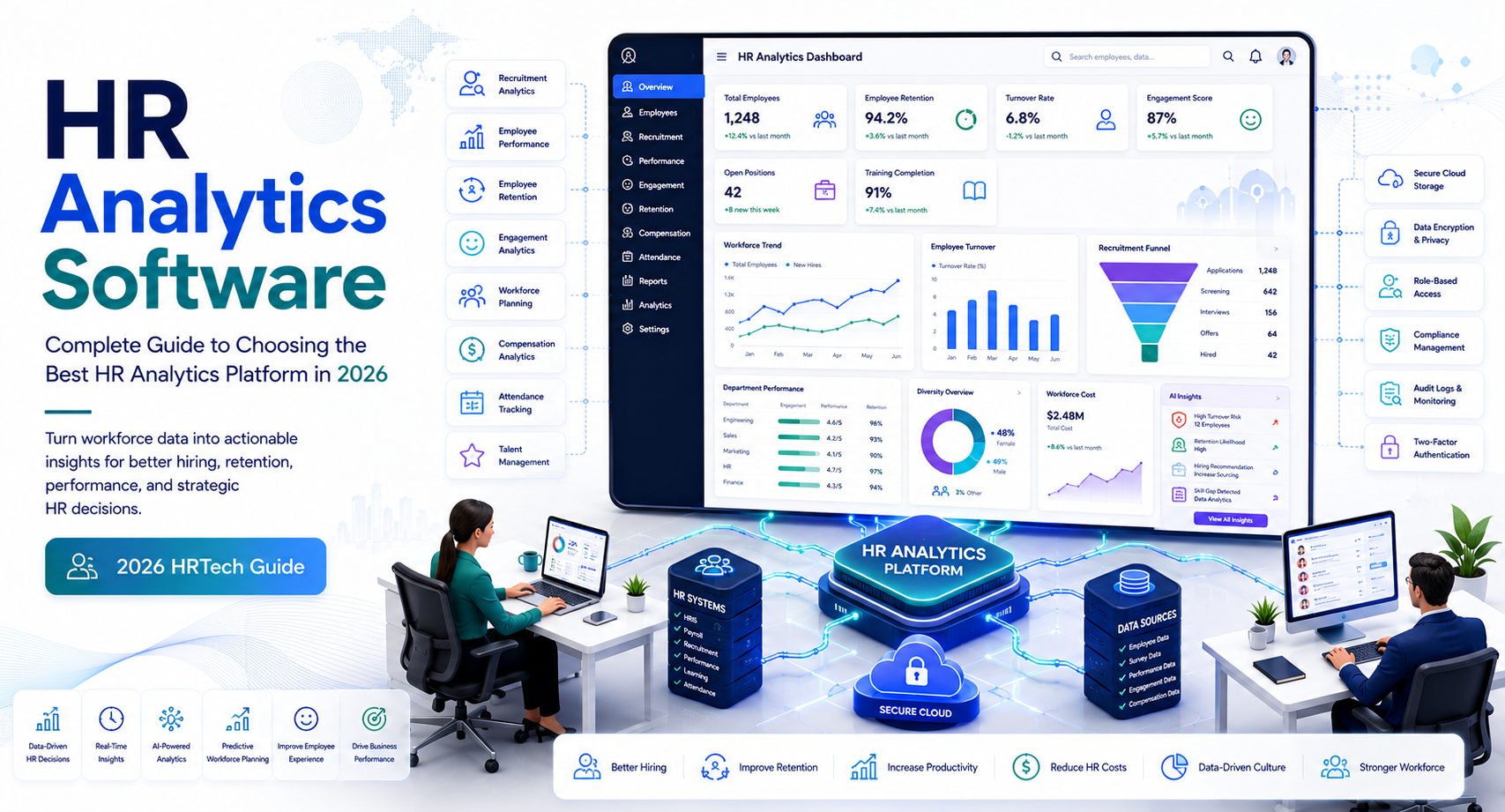
Instead of relying on disconnected spreadsheets and manually prepared reports, HR analytics platforms bring workforce information together and turn it into dashboards, trends, metrics, and decision-support insights. The best systems can help HR teams understand workforce costs, retention, recruitment, absenteeism, performance, diversity metrics, workforce planning, and other areas.
This guide explains what HR analytics software does, which features matter, how organizations in the United States can evaluate platforms, where analytics can improve HR decisions, and what to consider before purchasing.
What Is HR Analytics Software?
HR analytics software is technology that collects, organizes, analyzes, and visualizes workforce data to help organizations make better human resources decisions.
Depending on the platform, it can connect data from multiple HR systems and transform it into dashboards, reports, trends, forecasts, and actionable insights.
Common data sources include:
- Human resources information systems (HRIS)
- Payroll software
- Applicant tracking systems
- Time and attendance platforms
- Performance management systems
- Learning management systems
- Benefits platforms
- Employee surveys
- Workforce scheduling systems
For example, an HR manager might discover that the company’s overall turnover rate is 15%. That number alone does not explain the problem.
Analytics can help break it down by:
- Department
- Location
- Job role
- Tenure
- Manager
- Hiring cohort
- Employment type
- Compensation level
The result is a more useful question:
Where is turnover concentrated, and what factors appear to be associated with it?
That distinction is central to effective people analytics.
HR Reporting vs. HR Analytics
Traditional HR reporting primarily answers:
What happened?
HR analytics aims to answer additional questions:
Why did it happen?
What is likely to happen next?
What actions should we consider?
For example:
Reporting: 22 employees left the company last quarter.
Analytics: Voluntary turnover is concentrated among employees with less than 12 months of tenure in three specific departments.
Action: HR investigates onboarding, manager practices, workload, compensation, and career-development factors in those departments.
Analytics does not automatically prove causation. It provides evidence that helps HR teams investigate the underlying issue.
Why Businesses Use HR Analytics Software
Workforce decisions can become expensive when organizations rely on assumptions instead of evidence.
HR analytics software helps create a more consistent way to examine workforce trends.
1. Understand Employee Turnover
Employee turnover is one of the most common use cases.
A basic turnover report tells HR how many people left.
A stronger analytics platform can help identify patterns around:
- Voluntary turnover
- Involuntary turnover
- New-hire turnover
- Department turnover
- Location-based turnover
- Tenure-related turnover
- Role-specific turnover
Example
Suppose a company discovers that employees in one department are leaving at a substantially higher rate than the company average.
Instead of immediately increasing salaries, HR can examine several factors:
- Compensation
- Manager changes
- Workload
- Overtime
- Promotion opportunities
- Employee engagement
- Tenure
- Hiring volume
- Training
This produces a more informed investigation.
2. Improve Recruitment Analytics
Recruitment teams can use analytics to understand how effectively their hiring process works.
Useful metrics include:
- Time to hire
- Time to fill
- Cost per hire
- Applicant-to-interview ratio
- Interview-to-offer ratio
- Offer acceptance rate
- Source of hire
- New-hire retention
- Hiring manager response time
A company might discover that one recruiting channel generates many applicants but very few successful hires.
Another source may produce fewer applicants but significantly stronger retention.
Without analytics, HR may continue investing in volume rather than quality.
3. Analyze Absenteeism and Workforce Availability
HR analytics can also identify patterns in employee absence.
For example, organizations may analyze:
- Absence frequency
- Absence duration
- Department-level patterns
- Seasonal trends
- Overtime relationships
- Schedule-related patterns
This can help managers identify workforce planning issues.
However, organizations should be careful about using employee data to make sensitive decisions. Analytics should support legitimate workforce planning and HR processes rather than becoming a tool for intrusive employee surveillance.
4. Support Workforce Planning
HR leaders increasingly need to understand future workforce requirements.
Analytics can help compare:
Current workforce → expected demand → projected gaps → hiring or development requirements
For example, a company expecting substantial growth may analyze:
- Current headcount
- Employee turnover
- Retirement patterns
- Skills availability
- Hiring trends
- Internal mobility
- Department growth
This can help HR determine whether the organization needs to recruit externally, develop existing employees, restructure teams, or combine several approaches.
Key Features of the Best HR Analytics Software
There is no single platform that is automatically the best HR analytics software for every organization.
The right choice depends on company size, data maturity, existing HR technology, reporting requirements, security needs, and budget.
However, several capabilities deserve close attention.
Workforce Dashboards
Dashboards should make important metrics easy to understand.
A good dashboard may include:
- Headcount
- Turnover
- Absence
- Hiring
- Compensation
- Workforce demographics
- Employee tenure
- Performance trends
Users should be able to filter information without needing advanced technical skills.
Custom Dashboards
Different users need different information.
An HR executive may want a company-wide workforce overview.
A recruiting manager may need hiring funnel metrics.
A department manager may only need information about their own team.
Custom dashboards and role-based access can accommodate these different requirements.
Data Integration
Integration is one of the most important factors in HR analytics.
If HR has to manually export and upload data from five different systems every week, the analytics platform may simply create another administrative burden.
Look for integrations with systems your organization already uses.
Potential connections include:
- HRIS
- Payroll
- ATS
- Performance management
- Time tracking
- Benefits
- Learning systems
- Finance platforms
APIs and Data Connectors
Larger organizations may need APIs or dedicated data connectors.
Ask vendors:
- Which systems integrate natively?
- Are integrations included in the subscription?
- How frequently is data synchronized?
- Is synchronization real-time or scheduled?
- Can custom fields be imported?
- What happens when an integration fails?
These questions can reveal important differences between competing products.
Predictive and Prescriptive HR Analytics
Some modern platforms go beyond historical reporting and offer predictive or AI-assisted analytics.
Predictive analytics attempts to estimate what may happen based on historical patterns.
Examples include:
- Potential turnover risk
- Future hiring requirements
- Workforce demand
- Absence trends
- Staffing shortages
Prescriptive analytics goes one step further by suggesting possible actions.
For example:
Employees in a particular role have a higher probability of leaving after a certain period.
That does not mean the organization should automatically take action against those employees.
Instead, HR might investigate whether career development, workload, compensation, management practices, or other factors are contributing to the observed pattern.
Treat Predictions as Signals, Not Decisions
This is especially important when analytics influence employment decisions.
The U.S. Equal Employment Opportunity Commission has emphasized that employment selection procedures and automated technologies can create discrimination risks. Federal employment discrimination laws still apply when technology is used in hiring and other employment decisions.
Therefore, organizations should avoid treating an algorithmic score as an unquestionable judgment about an employee or applicant.
A better approach is:
Analytics → human review → investigation → documented decision
rather than:
Analytics → automatic employment decision
HR Analytics, AI, and Responsible Data Use
AI capabilities are becoming increasingly common in workforce technology.
AI may help HR teams:
- Summarize workforce trends
- Identify unusual patterns
- Generate reports
- Answer questions about HR data
- Forecast workforce requirements
- Categorize employee feedback
- Assist with workforce planning
But greater automation also creates greater responsibility.
The National Institute of Standards and Technology’s AI Risk Management Framework provides a voluntary framework for organizations managing AI risks and promoting trustworthy and responsible AI use.
For HR applications, organizations should consider:
- Data quality
- Bias
- Explainability
- Human oversight
- Security
- Access controls
- Documentation
- Appropriate use
The objective should not be to use AI everywhere. It should be to use it where it improves decision-making without introducing unacceptable risks.
Data Security and Privacy Requirements
HR analytics platforms process sensitive workforce information.
Depending on the organization, datasets may include:
- Employee names
- Compensation information
- Performance information
- Employment history
- Attendance
- Benefits information
- Demographic information
- Leave information
- Recruiting information
Security should therefore be a core part of the buying process.
Security Features to Evaluate
Look for:
- Encryption in transit and at rest
- Multi-factor authentication
- Role-based access
- Single sign-on
- Audit logs
- Data backups
- Permission management
- Secure APIs
- Data retention controls
Role-Based Access
Not every employee should be able to see every HR metric.
For example:
HR administrator: Broad workforce access
Department manager: Team-level information
Executive: Aggregated company-level analytics
Recruiter: Recruitment-specific information
Granular permissions reduce unnecessary exposure.
HR Analytics Metrics Worth Tracking
The metrics you track should depend on your business objectives.
Common HR analytics KPIs include:
| HR Area | Example Metrics |
| Workforce | Headcount, growth rate, tenure |
| Retention | Turnover rate, voluntary turnover |
| Recruitment | Time to hire, cost per hire |
| Absence | Absence rate, absence frequency |
| Compensation | Payroll cost, pay distribution |
| Performance | Goal completion, performance trends |
| Learning | Training completion, skill development |
| Engagement | Survey scores, participation |
| Diversity | Workforce representation metrics |
| Workforce planning | Skills gaps, projected headcount |
The goal is not to collect every possible metric.
A dashboard containing 100 KPIs may look sophisticated but still fail to answer the questions leadership actually cares about.
A smaller set of well-defined metrics is often more useful.
How to Choose the Best HR Analytics Software
A structured buying process can prevent an expensive technology mistake.
Step 1: Define the Business Problem
Start with the problem, not the software.
Ask:
- Are we trying to reduce turnover?
- Improve recruitment?
- Control labor costs?
- Improve workforce planning?
- Understand absenteeism?
- Consolidate HR reporting?
- Give managers better workforce visibility?
Your answer should determine the software requirements.
Step 2: Audit Your Existing Data
Analytics quality depends heavily on data quality.
Check:
- Where employee data is stored
- Whether records are duplicated
- Whether employee IDs are consistent
- Which systems contain authoritative data
- Whether historical data is available
- Whether important fields are missing
A sophisticated analytics platform cannot magically correct unreliable source data.
The Data Quality Rule
Bad data in → unreliable analysis out.
Before investing heavily in analytics, establish clear ownership and definitions for important metrics.
For example, make sure everyone agrees on what “turnover rate” means before comparing dashboards.
Step 3: Test the Reporting Experience
Ask vendors to demonstrate real scenarios.
For example:
“Show us how we would identify turnover among employees with less than two years of tenure in a specific department.”
Then observe:
- How many clicks are required?
- Can nontechnical HR users perform the analysis?
- Can results be exported?
- Can dashboards be customized?
- Can managers access appropriate information?
A platform should make useful analysis easier, not merely provide attractive charts.
HR Analytics Software Pricing and Total Cost
Pricing varies considerably across vendors.
Costs may depend on:
- Number of employees
- Number of users
- Analytics modules
- Data integrations
- AI functionality
- Storage
- Implementation
- Custom reporting
- Support
- Training
Some platforms use employee-based pricing, while others use user-based or modular pricing.
Consider Total Cost of Ownership
Do not compare only the monthly subscription.
Calculate:
Software subscription + implementation + integrations + migration + training + support + internal administration
A platform that costs more but saves substantial manual reporting time may produce better overall value.
Common HR Analytics Software Buying Mistakes
Buying Too Much Technology
A company does not need an advanced predictive analytics platform if its basic workforce data is still stored in disconnected spreadsheets.
Build analytics maturity progressively.
Ignoring Data Governance
Define who owns each dataset and who is responsible for correcting errors.
Giving Everyone Access
Sensitive HR information should be available only to people who need it.
Treating Correlation as Causation
If employees who work overtime leave more often, that does not automatically prove overtime caused the departures.
Analytics identifies relationships worth investigating.
Automating Sensitive Decisions Too Quickly
Employment decisions deserve careful human oversight.
The EEOC advises employers to use objective, job-related criteria and monitor employment practices for potential discriminatory effects.
HR Analytics Software Implementation Checklist
Before going live, prepare a simple implementation plan.
Data Preparation
- Identify source systems
- Clean duplicate records
- Standardize employee IDs
- Define metric calculations
- Establish data ownership
Technology
- Configure integrations
- Set user permissions
- Configure dashboards
- Test data synchronization
- Establish backup procedures
People
- Train HR users
- Train managers
- Document reporting procedures
- Establish support ownership
Governance
- Define acceptable uses
- Review access permissions
- Document sensitive metrics
- Establish review procedures for AI-assisted insights
- Schedule regular data-quality checks
A phased implementation is often easier to manage than attempting to deploy every analytics capability simultaneously.
May you like : Corporate Software Inspector: Complete Guide for Businesses in 2026
Frequently Asked Questions
What is HR analytics software used for?
HR analytics software is used to analyze workforce data and support decisions involving recruitment, turnover, absenteeism, workforce planning, compensation, performance, engagement, and other HR activities.
What is the best HR analytics software?
The best HR analytics software depends on an organization’s size, HR systems, data maturity, reporting needs, budget, integrations, and security requirements. A platform that works well for a large enterprise may be unnecessarily complex for a small business.
Can HR analytics software predict employee turnover?
Some platforms use statistical or machine-learning models to identify patterns associated with turnover and estimate future risk. These predictions should be treated as signals for investigation rather than definitive judgments about individual employees.
Is HR analytics software secure?
It can be, but security depends on the vendor’s architecture, controls, configuration, and the organization’s own access policies. Buyers should evaluate encryption, authentication, permissions, audit logs, backups, integrations, and data-retention practices before selecting a platform.
How does HR analytics differ from HR reporting?
HR reporting generally focuses on describing what happened, while HR analytics examines patterns and relationships to help explain what happened and support future decisions. Advanced analytics may also estimate potential future outcomes.
Conclusion
HR analytics software can turn scattered workforce information into a more useful decision-making resource. Instead of relying entirely on manually prepared spreadsheets, HR teams can analyze turnover, recruitment, absenteeism, workforce costs, performance, engagement, and workforce planning through centralized dashboards and reports.
But software alone does not create good people analytics.
The strongest results come from combining reliable data, clearly defined metrics, appropriate technology, strong security, responsible governance, and human judgment.
For U.S. employers, this last point is especially important when analytics or AI influence hiring, promotion, performance evaluation, or other employment decisions. Federal equal employment opportunity requirements still apply to technology-assisted employment practices, and organizations should evaluate potential discriminatory effects rather than assuming an algorithm is automatically neutral.
When evaluating the best HR analytics software, start by identifying the business questions you need to answer. Then assess your existing data, integrations, reporting requirements, security controls, AI capabilities, usability, and total cost of ownership.
The right platform should not simply produce more HR data. It should help your organization understand that data well enough to make better, more defensible workforce decisions.
Internal linking opportunities: Consider linking this article to related guides covering HR analytics metrics, HR software, workforce management software, employee engagement software, HR reporting software, people analytics, HR data management, and AI in HR.