Great Plains Accounting Software: Complete Guide to Features, Benefits & Training 2026
Enterprise accounting software has evolved significantly over the past two decades, but many organizations still rely on trusted systems that have supported their financial operations for years. One of the most recognized names in this category is Great Plains accounting software, now known as Microsoft Dynamics GP.
Although Microsoft has shifted much of its focus toward cloud-based ERP solutions like Dynamics 365 Business Central, thousands of businesses across the United States continue to use Dynamics GP for accounting, financial reporting, inventory management, payroll, and business operations. For many organizations, the software remains reliable, familiar, and deeply integrated into daily workflows.
At the same time, companies using Dynamics GP face important questions:
- Is Great Plains accounting software still supported?
- Should you continue using it or migrate to a newer platform?
- What features does it offer?
- How difficult is it to learn?
- Where can employees find quality Great Plains accounting software training?
This guide answers those questions and provides a practical overview of the software, its capabilities, training options, and factors to consider before investing in upgrades or migration projects.
Whether you’re a finance manager, accountant, IT administrator, or business owner evaluating ERP solutions, this article will help you understand where Great Plains fits in today’s business software landscape.
What Is Great Plains Accounting Software?
Great Plains accounting software is an enterprise resource planning (ERP) system originally developed by Great Plains Software before being acquired by Microsoft in 2001. Today, it is known as Microsoft Dynamics GP.
The platform was designed to help growing businesses manage financial operations through a centralized system that integrates accounting, purchasing, inventory, payroll, reporting, and other business functions.
Unlike basic accounting software that focuses primarily on bookkeeping, Dynamics GP supports a broader range of operational processes, making it suitable for mid-sized organizations with more complex financial and reporting requirements.
Over the years, Microsoft has continued to enhance the platform with improved reporting, workflow automation, integration capabilities, and security features while encouraging new customers to adopt cloud-based ERP solutions.
A Brief History of Microsoft Dynamics GP
Understanding the software’s background helps explain why it remains widely used today.
The Early Years
Great Plains Software was founded in the early 1980s and quickly became one of the leading providers of accounting software for small and mid-sized businesses.
Its reputation was built on:
- Strong financial management tools
- Reliable reporting
- Expandable modules
- Flexible customization
Microsoft’s Acquisition
In 2001, Microsoft acquired Great Plains Software and incorporated it into its Microsoft Business Solutions portfolio.
The software was later renamed Microsoft Dynamics GP, becoming part of the Microsoft Dynamics family alongside Dynamics NAV, Dynamics AX, and CRM solutions.
Dynamics GP Today
While Microsoft continues to provide support for existing Dynamics GP customers, its long-term ERP strategy emphasizes cloud-first products such as Dynamics 365 Business Central.
As a result, many businesses are evaluating whether to continue using Dynamics GP, upgrade existing installations, or transition to newer ERP platforms.
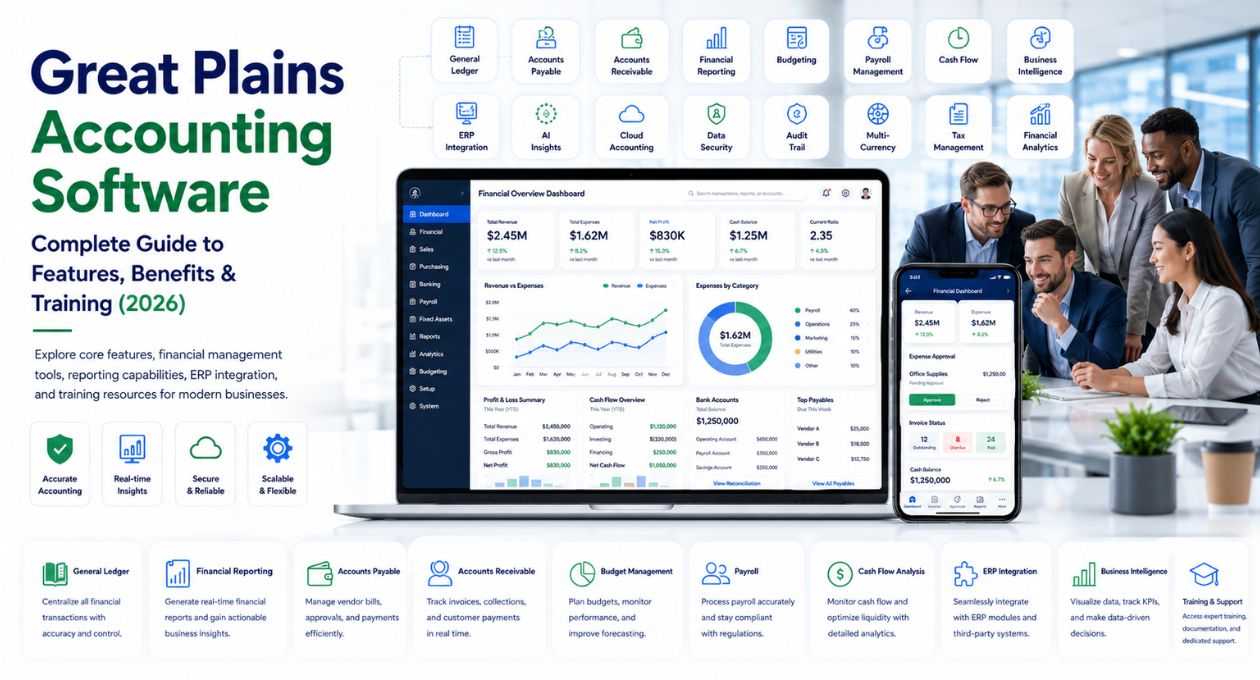
Key Features of Great Plains Accounting Software
One reason Dynamics GP has remained popular is its broad set of business management capabilities.
Instead of purchasing separate applications for accounting, purchasing, inventory, and reporting, organizations can manage these functions within a single ERP environment.
Financial Management
Financial management remains the platform’s core strength.
Key capabilities include:
- General ledger
- Accounts payable
- Accounts receivable
- Cash management
- Bank reconciliation
- Budget management
- Fixed asset accounting
These features help finance teams maintain accurate records while simplifying month-end and year-end closing processes.
Payroll Management
Dynamics GP includes payroll functionality designed for organizations that want payroll integrated directly with accounting.
Features include:
- Employee records
- Payroll processing
- Tax calculations
- Benefits administration
- Direct deposit support
- Payroll reporting
Many businesses also integrate third-party payroll solutions depending on their operational needs.
Inventory Management
Companies managing physical products benefit from inventory tracking tools that provide greater visibility into stock levels and purchasing activities.
Inventory features include:
- Item tracking
- Warehouse management
- Purchase orders
- Vendor management
- Inventory valuation
- Stock transfers
These capabilities support better purchasing decisions while reducing inventory inaccuracies.
Purchasing and Procurement
The purchasing module helps organizations manage procurement from request through payment.
Typical functions include:
- Purchase requisitions
- Vendor management
- Approval workflows
- Purchase orders
- Invoice matching
- Payment processing
Automation reduces manual data entry while improving purchasing accuracy.
Financial Reporting
One of the platform’s strongest advantages is financial reporting.
Organizations can generate reports such as:
- Profit and loss statements
- Balance sheets
- Cash flow reports
- Budget comparisons
- Departmental reports
- Audit reports
Many businesses also integrate Microsoft Excel and Microsoft Power BI for additional reporting and visualization capabilities.
Workflow Automation
Modern versions of Dynamics GP support workflow automation that reduces repetitive administrative tasks.
Examples include:
- Purchase approval workflows
- Expense approvals
- Vendor approval processes
- Document routing
- Notification alerts
Automation improves efficiency while helping organizations maintain consistent business processes.
Benefits of Great Plains Accounting Software
Although newer ERP platforms offer cloud-native features, Dynamics GP continues to deliver significant value for many organizations.
Mature and Reliable Platform
Dynamics GP has been refined over decades of real-world business use.
Its stability makes it attractive to organizations that prioritize reliability over frequent software changes.
Comprehensive Financial Management
The software provides a wide range of accounting capabilities beyond basic bookkeeping.
Finance departments benefit from:
- Strong reporting
- Multi-company management
- Budget control
- Audit support
- Financial consolidation
Flexible Customization
Many organizations have customized Dynamics GP to match their unique business processes.
Customization options include:
- Custom reports
- Workflow modifications
- Third-party integrations
- Industry-specific modules
- Custom fields
This flexibility has contributed to the software’s long-term popularity.
Microsoft Ecosystem Integration
Dynamics GP integrates with several Microsoft technologies, including:
- Microsoft Office
- Excel
- Outlook
- SQL Server
- Power BI
- SharePoint
These integrations improve productivity while allowing employees to work with familiar tools.
Who Uses Great Plains Accounting Software?
Although Dynamics GP serves many industries, it is particularly common among mid-sized organizations with complex financial operations.
Examples include:
Manufacturing
Manufacturers use Dynamics GP to manage inventory, purchasing, production planning, and financial reporting.
Distribution
Wholesale distributors benefit from integrated inventory management and purchasing workflows.
Professional Services
Consulting firms, engineering companies, and legal practices often rely on Dynamics GP for project accounting and financial management.
Healthcare
Healthcare organizations use the platform to manage financial reporting, purchasing, budgeting, and operational expenses while integrating with specialized healthcare systems.
Nonprofit Organizations
Many nonprofit organizations appreciate the software’s budgeting, grant tracking, and financial reporting capabilities.
What Is Great Plains Accounting Software Training?
Learning an ERP system requires more than understanding accounting principles. Employees also need to know how the software supports their specific roles and daily workflows.
Great Plains accounting software training refers to educational programs that help users learn how to navigate Microsoft Dynamics GP, perform accounting tasks, generate reports, manage inventory, process payroll, and administer the system.
Training is valuable for:
- New employees
- Accountants
- Finance managers
- Payroll administrators
- IT professionals
- System administrators
- Business analysts
Well-trained users are more likely to use the software efficiently, reduce errors, and take advantage of advanced features.
Types of Great Plains Accounting Software Training
Training is available in several formats depending on an organization’s learning preferences and technical requirements.
Instructor-Led Training
Instructor-led classes provide structured learning with opportunities to ask questions and complete hands-on exercises.
This format is often preferred during large ERP implementations.
Online Self-Paced Courses
Many organizations choose self-paced online learning because employees can complete lessons according to their schedules.
Online courses typically include:
- Video tutorials
- Practice exercises
- Downloadable guides
- Knowledge assessments
On-Site Corporate Training
Larger organizations sometimes arrange customized training sessions tailored to their workflows, reports, and internal processes.
This approach helps employees apply concepts directly to their daily responsibilities.
Role-Based Training
Different departments use Dynamics GP differently.
For example:
- Accountants focus on financial reporting.
- Payroll staff learn payroll processing.
- Purchasing teams learn procurement workflows.
- Inventory managers learn stock management.
- IT administrators focus on system configuration and security.
Role-based training improves learning efficiency by focusing on relevant tasks.
Why Investing in Training Matters
Organizations sometimes underestimate the importance of user training when implementing ERP software.
However, inadequate training often leads to:
- Data entry mistakes
- Reporting inaccuracies
- Slower adoption
- Increased support requests
- Reduced productivity
- Underused software features
By contrast, effective Great Plains accounting software training helps employees work more confidently, improves reporting accuracy, and enables organizations to get greater value from their ERP investment.
Internal Linking Opportunity: Link to related resources such as ERP Software Guide, Accounting Software Comparison, Microsoft Dynamics 365 Business Central, Cloud ERP Solutions, or Financial Management Software.
Is Great Plains Accounting Software Still Supported?
One of the most common questions businesses ask is whether Great Plains accounting software is still supported.
The answer is yes—but with an important distinction.
Microsoft continues to provide product support, security updates, and lifecycle maintenance for Microsoft Dynamics GP according to its published support policy. However, the company’s long-term ERP strategy is focused on cloud-based solutions, particularly Microsoft Dynamics 365 Business Central.
For organizations currently using Dynamics GP, this means:
- Existing systems can continue to operate reliably.
- Security and product updates remain available during the supported lifecycle.
- Businesses should monitor Microsoft’s support roadmap and future announcements.
- Long-term technology planning should include evaluating cloud ERP options.
For many companies, there is no immediate need to migrate. Instead, the decision should be based on business goals, infrastructure requirements, budget, and future growth plans.
Should You Continue Using Dynamics GP or Migrate?
There is no one-size-fits-all answer. The right choice depends on your organization’s current environment and long-term strategy.
Continue Using Dynamics GP If:
- Your current system meets operational needs.
- Employees are already well trained.
- Existing customizations are critical to your business.
- Migration costs outweigh the immediate benefits.
- You have an internal or external team that supports the system.
For businesses with stable processes, Dynamics GP can continue to deliver reliable financial management.
Consider Migrating If:
- You want a cloud-first ERP platform.
- Your workforce requires remote access from multiple locations.
- You need modern automation and AI capabilities.
- Existing customizations have become difficult to maintain.
- Your organization is growing rapidly.
- You want tighter integration with newer Microsoft business applications.
Migration is a strategic business decision—not simply a software upgrade.
Best Practices for Implementing Great Plains Accounting Software
Whether you’re deploying Dynamics GP for the first time or upgrading an existing environment, following proven implementation practices can significantly improve project success.
Define Business Requirements Early
Before configuring the system, document:
- Financial workflows
- Approval processes
- Reporting requirements
- Department-specific needs
- Compliance obligations
Clear requirements help reduce costly changes later in the project.
Clean Existing Financial Data
Migrating inaccurate or outdated information creates unnecessary problems.
Before importing data:
- Remove duplicate vendors.
- Archive inactive customers.
- Verify account structures.
- Reconcile balances.
- Standardize naming conventions.
Clean data improves reporting accuracy from day one.
Configure Security Carefully
Financial information should only be accessible to authorized personnel.
Use role-based permissions to limit access according to employee responsibilities.
For example:
- Payroll staff should only access payroll functions.
- Purchasing teams should manage procurement records.
- Executives may require reporting dashboards without transaction editing rights.
Test Before Going Live
A pilot implementation helps identify issues before they affect daily operations.
Test:
- Financial transactions
- Payroll processing
- Month-end closing
- Reporting
- Integrations
- User permissions
Resolving issues early reduces operational disruption after launch.
Provide Ongoing Training
Training should continue after implementation.
As new employees join and business processes evolve, regular refresher sessions help maintain productivity and reduce user errors.
Advantages of Great Plains Accounting Software
Although newer ERP platforms have entered the market, Dynamics GP continues to offer several strengths.
Mature and Stable Platform
Decades of continuous development have produced a dependable ERP solution trusted by thousands of organizations.
Comprehensive Financial Functionality
Dynamics GP provides extensive accounting capabilities suitable for organizations with complex financial operations.
Strong Reporting Tools
Built-in reporting combined with Microsoft Excel and Power BI integration helps finance teams generate meaningful business insights.
Flexible Customization
Organizations can tailor workflows, reports, forms, and integrations to support industry-specific requirements.
Large User Community
Because Dynamics GP has been widely adopted for many years, businesses can often find experienced consultants, implementation partners, trainers, and support resources.
Potential Limitations to Consider
Every ERP system has trade-offs, and Dynamics GP is no exception.
Legacy Architecture
Compared with modern cloud-native ERP platforms, Dynamics GP’s architecture may require more infrastructure management and ongoing maintenance.
Cloud Strategy
Although cloud deployment options exist, Microsoft’s primary innovation efforts are focused on Dynamics 365 Business Central rather than Dynamics GP.
Organizations planning long-term digital transformation should consider how this aligns with their future technology roadmap.
Customization Complexity
Highly customized environments may require additional effort during upgrades or migrations.
Documenting existing customizations before making major changes can reduce project risks.
Training Requirements
Because ERP systems manage many interconnected business processes, employees often require structured onboarding before becoming proficient.
How Much Does Great Plains Accounting Software Cost?
The total cost depends on several factors, including licensing, implementation, customization, training, and ongoing support.
Typical cost considerations include:
- Software licensing
- Implementation services
- Data migration
- Custom development
- User training
- Technical support
- Annual maintenance
- Infrastructure or hosting
Organizations should evaluate the total cost of ownership (TCO) rather than focusing solely on initial licensing expenses.
For businesses considering migration, it’s also important to compare the long-term operational costs of maintaining an on-premises ERP system versus adopting a cloud-based subscription model.
Future of Great Plains Accounting Software
Many businesses are asking what the future holds for Dynamics GP.
While Microsoft continues supporting existing customers, new ERP investments are increasingly centered around cloud-based platforms.
Future ERP trends include:
Cloud ERP
Organizations continue moving financial systems to the cloud to improve scalability, accessibility, and disaster recovery.
Artificial Intelligence
Modern ERP platforms increasingly use AI for:
- Financial forecasting
- Invoice processing
- Cash flow analysis
- Fraud detection
- Automated reporting
Workflow Automation
Automation continues reducing repetitive accounting tasks, allowing finance professionals to focus on analysis and strategic planning.
Business Intelligence
Advanced analytics and real-time dashboards are becoming standard expectations for finance teams.
Companies evaluating long-term ERP strategies should consider how future technology investments align with these trends.
May you like: Corporate Software Inspector: Complete Guide for Businesses in 2026
Frequently Asked Questions
What is Great Plains accounting software?
Great Plains accounting software, now called Microsoft Dynamics GP, is an enterprise resource planning (ERP) system that helps organizations manage accounting, financial reporting, inventory, purchasing, payroll, and other core business operations.
Is Great Plains the same as Microsoft Dynamics GP?
Yes. Microsoft acquired Great Plains Software in 2001 and renamed the product Microsoft Dynamics GP. Many businesses still refer to it by its original name.
Is Great Plains accounting software still used?
Yes. Thousands of organizations across the United States and other countries continue to use Microsoft Dynamics GP because of its mature functionality, reliability, and extensive customization capabilities.
Where can I find Great Plains accounting software training?
Training is available through Microsoft partners, ERP consulting firms, online learning platforms, corporate training providers, and independent Dynamics GP specialists. Many organizations also develop customized internal training programs for employees.
Should I migrate from Dynamics GP to Dynamics 365 Business Central?
It depends on your organization’s needs. If your current system continues to meet operational requirements, there may be no immediate reason to migrate. However, businesses seeking cloud-native capabilities, enhanced automation, and long-term Microsoft innovation may benefit from evaluating Dynamics 365 Business Central.
Conclusion
For more than three decades, Great Plains accounting software has helped organizations manage financial operations with reliability and flexibility. Although the ERP market has evolved, Microsoft Dynamics GP remains a trusted solution for many businesses that require comprehensive accounting, inventory, payroll, and reporting capabilities.
At the same time, organizations should regularly review their technology strategy. As cloud ERP platforms become more advanced, evaluating future requirements—including scalability, remote accessibility, automation, and integration—can help determine whether continuing with Dynamics GP or planning a migration is the better long-term choice.
Equally important is investing in Great Plains accounting software training. Well-trained employees are more productive, make fewer mistakes, and are better equipped to use the software’s full range of features. Whether you’re onboarding new team members or preparing for an ERP upgrade, ongoing education helps maximize the value of your investment.
Next Step: Assess your current financial processes, identify any operational challenges, and compare your existing ERP capabilities with future business goals. You may also benefit from exploring related guides on ERP software, cloud accounting solutions, Microsoft Dynamics 365 Business Central, financial management software, or business intelligence tools before making your next technology decision.