Patient Engagement Software: Complete Guide to Features, Benefits & Choosing the Right Platform
When patients struggle to book appointments, miss reminders, cannot easily access health information, or have difficulty communicating with their care team, the problem is rarely just administrative. Poor communication can affect the entire patient experience.
Healthcare organizations in the United States are increasingly using patient engagement software to make interactions more convenient and connected. These platforms can bring appointment scheduling, reminders, patient messaging, digital forms, education, surveys, and other communication tools into a more organized experience.
But choosing software is not simply a matter of finding the platform with the most features. A small medical practice may need a very different solution from a large health system.
This guide explains what patient engagement software is, how it works, which features matter, what benefits it can provide, how to evaluate the best patient engagement software, and what healthcare organizations should consider before purchasing.
What Is Patient Engagement Software?
Patient engagement software is technology that helps healthcare organizations communicate with patients and make it easier for them to participate in their healthcare journey.
Depending on the platform, it may support communication before, during, and after an appointment.
Common capabilities include:
- Appointment scheduling
- Automated reminders
- Patient portals
- Secure messaging
- Digital intake forms
- Patient education
- Surveys and feedback
- Telehealth support
- Prescription or care reminders
- Payment communication
- Personalized notifications
The objective is not simply to send more messages.
A well-designed system should make it easier for patients to complete important tasks, understand information, communicate with providers, and stay connected with their care team.
Patient Engagement vs. Patient Communication
The two terms are closely related but not identical.
Patient communication generally focuses on exchanging information between a healthcare organization and its patients.
Patient engagement is broader. It includes communication as well as tools and processes that encourage patients to participate actively in their care.
For example, a reminder telling a patient about tomorrow’s appointment is communication.
Allowing the patient to confirm the appointment, complete intake forms, review instructions, and send a secure question through the same digital experience moves closer to active engagement.
How Patient Engagement Software Works
Patient engagement platforms typically connect with existing healthcare systems, such as an electronic health record (EHR), practice management system, scheduling platform, or billing application.
A typical workflow might look like this:
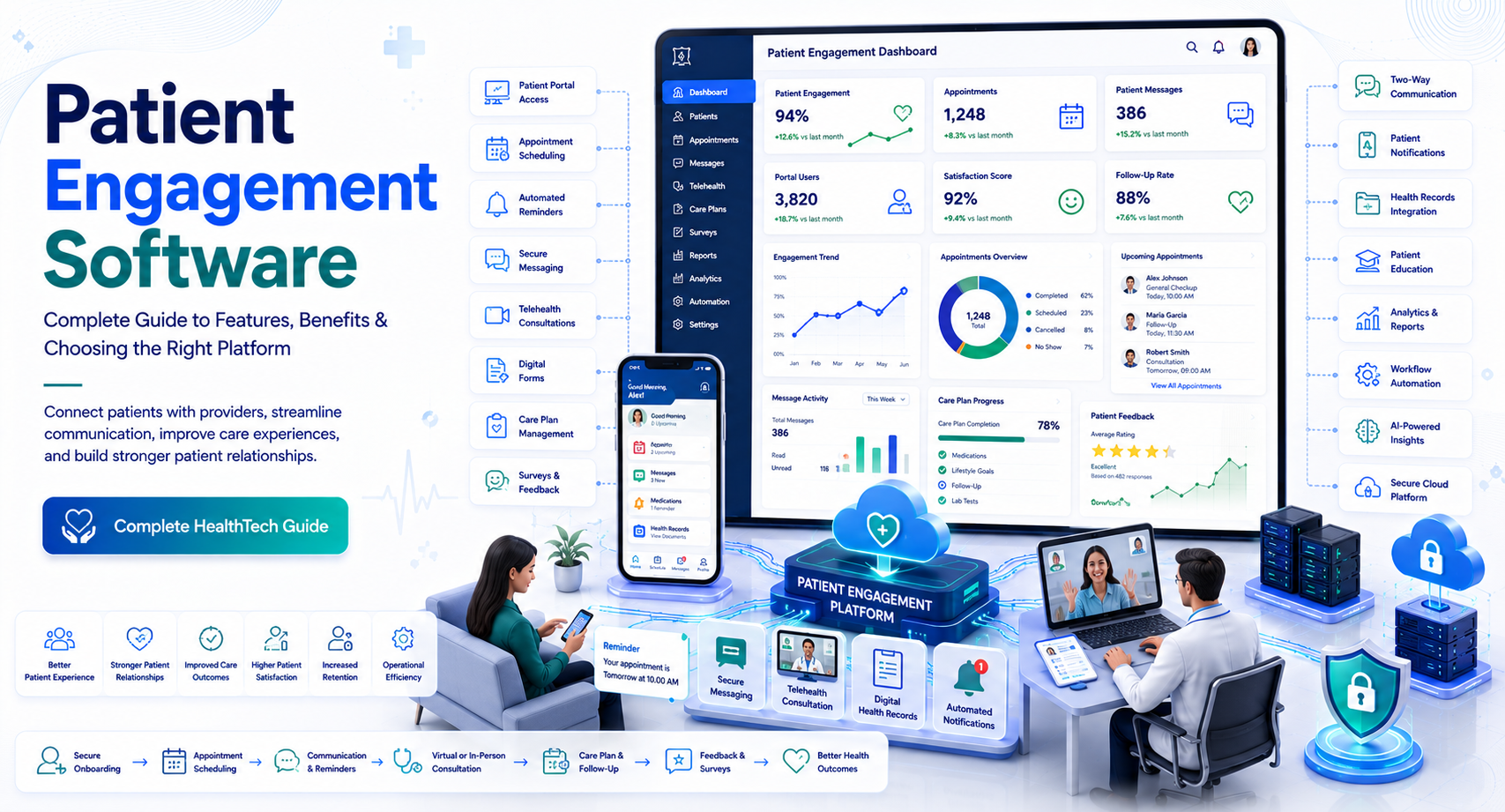
Appointment scheduled → Automated reminder → Digital intake → Appointment → Follow-up message → Patient feedback → Ongoing care communication
For example, consider a primary care practice in Florida.
A patient schedules an annual visit online. The engagement platform can send a reminder several days before the appointment. The patient confirms the visit, completes digital forms, and receives instructions through the organization’s approved communication channel.
After the visit, the practice can send appropriate follow-up information or a patient satisfaction survey.
The exact workflow depends on the software, healthcare organization, and integrations involved.
Key Features of Patient Engagement Software
Not every healthcare organization needs every available feature. The most important question is whether the platform solves the communication and workflow problems your organization actually faces.
1. Appointment Scheduling and Reminders
Appointment management is one of the most common patient engagement use cases.
Useful functionality may include:
- Online appointment requests
- Self-scheduling
- Appointment confirmations
- Automated reminders
- Rescheduling
- Cancellation notifications
- Waitlist management
- Two-way appointment communication
Reducing unnecessary phone calls can help administrative teams spend more time on tasks that require human attention.
Why Two-Way Communication Matters
A one-way reminder tells a patient that an appointment is coming.
A two-way workflow may allow the patient to confirm, cancel, or request a change.
That distinction can make the technology more useful operationally.
2. Secure Patient Messaging
Patients increasingly expect convenient ways to communicate with healthcare organizations.
Patient engagement platforms may provide secure messaging for appropriate interactions, such as:
- Appointment questions
- Administrative requests
- Follow-up communication
- Care instructions
- General non-emergency communication
Healthcare organizations should clearly define what messaging is appropriate for and what situations require immediate medical attention.
Patient messaging should never be treated as a substitute for emergency services.
3. Digital Forms and Patient Intake
Paper-based forms can create unnecessary administrative work.
Patient engagement software can allow patients to complete forms electronically before arriving at the facility.
Examples include:
- Demographic information
- Insurance details
- Medical history questionnaires
- Consent forms
- Pre-visit questionnaires
The biggest advantage is not simply replacing paper.
The system should ideally transfer appropriate information into the organization’s existing workflow instead of creating another isolated database that employees must maintain manually.
4. Patient Portal Access
Patient portals can give patients access to selected healthcare information and services.
Depending on the healthcare organization and connected systems, portal functionality may include:
- Health information
- Test results
- Appointment details
- Secure messaging
- Educational materials
- Care instructions
- Prescription-related information
Organizations should evaluate how well the portal integrates with their EHR rather than treating the portal as an independent feature.
5. Patient Education
Patient engagement is not only about appointments.
Digital platforms can help healthcare organizations provide educational content related to:
- Conditions
- Medications
- Procedures
- Preventive care
- Lifestyle recommendations
- Post-visit instructions
The quality and appropriateness of the content matter.
Healthcare organizations should avoid overwhelming patients with large amounts of generic information. Relevant, timely content is generally more useful than a library that patients cannot navigate.
6. Surveys and Patient Feedback
Feedback tools can help organizations understand the patient experience.
A platform might collect feedback about:
- Scheduling
- Check-in
- Communication
- Wait times
- Staff interactions
- Digital experience
- Overall satisfaction
The important step is acting on the information.
Collecting hundreds of survey responses without reviewing trends or assigning improvement actions creates little value.
7. Telehealth and Digital Care Support
Some patient engagement platforms include or integrate with telehealth functionality.
Depending on the system, patients may receive:
- Virtual appointment links
- Pre-visit instructions
- Reminders
- Digital check-in
- Follow-up communication
Telehealth integration can be particularly useful when patients interact with several digital tools during a single care journey.
Benefits of Patient Engagement Software
The value of patient engagement software depends heavily on implementation, workflow design, patient adoption, and integration quality.
Better Patient Communication
Automated and secure communication can make it easier to provide timely information without requiring staff to contact every patient manually.
Greater Convenience
Patients can potentially complete tasks outside traditional office hours.
For example, a patient may confirm an appointment or complete an intake form from home instead of calling the office.
Reduced Administrative Work
Automation can reduce repetitive tasks such as:
- Sending appointment reminders
- Collecting routine forms
- Confirming appointments
- Distributing standard information
This can free staff to focus on exceptions and patient needs that require personal attention.
Improved Appointment Management
Automated reminders and self-service scheduling can support better appointment workflows.
However, healthcare organizations should measure actual outcomes rather than assuming automation will automatically reduce no-shows.
Useful metrics include:
- Appointment confirmation rate
- Cancellation rate
- Rescheduling rate
- No-show rate
- Online scheduling adoption
More Consistent Patient Experiences
Without a centralized engagement strategy, patients may receive inconsistent communication through phone calls, email, paper, and unrelated applications.
An integrated platform can help create a more consistent digital experience.
What to Look for in the Best Patient Engagement Software
The best patient engagement software is not necessarily the platform with the largest feature set.
Instead, evaluate the system against your organization’s specific requirements.
Integration With Your EHR
Integration should be near the top of your evaluation checklist.
Ask:
- Which EHR systems are supported?
- Is the integration native or third-party?
- What information can move between systems?
- How frequently is data synchronized?
- Are additional integration fees charged?
- Who manages integration issues?
A visually impressive patient app has limited value if staff must manually re-enter information into the EHR.
Security and Privacy
Healthcare organizations handle highly sensitive information.
In the United States, organizations should evaluate whether their technology and workflows appropriately address applicable privacy and security requirements, including HIPAA obligations where applicable.
Ask vendors about:
- Encryption
- Authentication
- Access controls
- Audit logs
- Data retention
- Security monitoring
- Incident response
- Business associate agreements where applicable
Do not treat a vendor’s statement that a product is “HIPAA compliant” as the end of the evaluation. Compliance depends on the broader technology, configuration, policies, contracts, and organizational practices.
Internal linking opportunity: Link to a detailed article about HIPAA-compliant healthcare software.
Ease of Use
Patient engagement software has two audiences:
- Healthcare staff
- Patients
Both experiences matter.
A system may have excellent capabilities but poor adoption if patients struggle to use it or employees find workflows cumbersome.
During demonstrations, test common tasks instead of watching only prepared presentations.
For example:
“Show us how a patient books an appointment, completes intake, receives a reminder, and communicates a follow-up question.”
This gives your team a much better understanding of actual usability.
Patient Engagement Software for Different Healthcare Organizations
Different organizations have different engagement requirements.
Small Medical Practices
A small practice may prioritize:
- Appointment reminders
- Online scheduling
- Digital forms
- Secure messaging
- Simple EHR integration
- Affordable pricing
The platform should not create excessive administrative complexity.
Specialty Practices
Specialists may need more targeted communication.
For example, a cardiology practice may require workflows for recurring appointments, follow-ups, education, and monitoring.
The platform should support the organization’s specific patient journey.
Hospitals and Health Systems
Large organizations may need:
- Multi-location support
- Enterprise integrations
- Multiple communication channels
- Advanced analytics
- Role-based access
- Scalable infrastructure
- Centralized administration
They may also need to coordinate engagement across different departments and facilities.
Behavioral and Mental Health Organizations
These organizations may have additional privacy, communication, and workflow considerations.
Patient engagement technology should be evaluated carefully for the nature of the information being handled and the organization’s regulatory responsibilities.
How to Choose Patient Engagement Software
A structured buying process can reduce the risk of choosing a platform that looks good during a sales demonstration but performs poorly after deployment.
Step 1: Identify the Patient Journey
Map the major interactions patients have with your organization.
For example:
Discovery → Scheduling → Registration → Visit → Follow-up → Ongoing Care
Identify where patients experience friction.
You may discover that your biggest problem is not communication itself but scheduling, intake, or fragmented systems.
Step 2: Define Measurable Goals
Do not start with vague goals such as “improve engagement.”
Create measurable objectives.
For example:
- Increase online appointment scheduling
- Reduce manual reminder calls
- Increase digital form completion
- Improve patient portal adoption
- Reduce appointment no-shows
- Improve response rates to surveys
Then establish a baseline before implementation.
Step 3: Shortlist Vendors
Compare vendors based on:
- Features
- Integration
- Security
- Usability
- Scalability
- Pricing
- Support
- Implementation
- Reporting
Avoid selecting software solely because another healthcare organization uses it.
Their workflows may be completely different.
Step 4: Request a Realistic Demo
Ask vendors to demonstrate your actual use cases.
For example:
“Show us what happens when a patient books an appointment online, cancels it, reschedules it, completes their forms, and receives a follow-up communication.”
Also ask what happens when something goes wrong.
Real-world exceptions often reveal more than the standard workflow.
Patient Engagement Software Cost
Pricing varies significantly depending on the platform and organization.
Common pricing factors include:
- Number of providers
- Number of locations
- Patient volume
- Features
- Communication volume
- Integrations
- Implementation services
- Customization
- Support level
Some vendors charge subscription fees, while others may use usage-based pricing or a combination of licensing and implementation costs.
Questions to Ask About Pricing
Before signing a contract, ask:
- Is pricing based on providers or patients?
- Are text messages charged separately?
- Are integrations included?
- Are implementation services included?
- Is training included?
- Are there setup fees?
- What support is included?
- How are additional locations priced?
- What happens when patient volume increases?
Compare total cost of ownership, not just the advertised monthly price.
Common Patient Engagement Software Mistakes
Choosing Too Many Features
More features can mean greater complexity.
Prioritize workflows that directly address your organization’s biggest problems.
Ignoring Accessibility
Patients have different levels of digital literacy and different accessibility needs.
Evaluate whether the software works well for patients using different devices, screen sizes, languages, and accessibility tools.
Treating Automation as a Replacement for Human Support
Automation is useful for routine tasks.
It should not make it harder for patients to reach a human when they need assistance.
Failing to Measure Adoption
Installing software does not mean patients will use it.
Track adoption metrics and identify where patients drop out of digital workflows.
Overlooking Staff Workflows
If staff must maintain multiple systems manually, the platform may increase rather than reduce administrative work.
May you like : https://fanii.shop/manufacturing-erp-software
Frequently Asked Questions
What is patient engagement software used for?
Patient engagement software is used to help healthcare organizations communicate with patients and support activities such as scheduling, reminders, digital forms, secure messaging, patient education, feedback, and portal access.
What is the best patient engagement software?
The best patient engagement software depends on your healthcare organization’s size, specialty, EHR, patient volume, workflow requirements, budget, and security needs. Integration and usability should be evaluated alongside features and price.
How does patient engagement software improve patient experience?
It can make healthcare interactions more convenient by allowing patients to complete tasks digitally, receive timely reminders, access information, communicate securely, and manage certain appointments without relying entirely on phone calls.
Is patient engagement software HIPAA compliant?
Some healthcare software is designed to support HIPAA requirements, but organizations should evaluate the vendor, contracts, security controls, configuration, and internal procedures. A product label alone does not establish complete HIPAA compliance.
How much does patient engagement software cost?
Costs vary based on factors such as provider count, patient volume, features, integrations, communication usage, implementation, and support. Healthcare organizations should compare the full cost of ownership before purchasing.
Conclusion
Patient engagement software can help healthcare organizations create more convenient, connected experiences by bringing communication, scheduling, digital forms, reminders, messaging, education, and feedback into coordinated workflows.
The strongest implementations start with the patient journey, not the software feature list.
Before choosing a platform, identify where patients and staff experience the most friction. Define measurable goals, verify EHR integration, evaluate privacy and security requirements, test usability, and ask vendors to demonstrate realistic workflows.
For organizations comparing the best patient engagement software, the right solution fits existing clinical and administrative processes while providing a straightforward experience for patients.
The next practical step is to create a requirements checklist based on your patient journey, then compare shortlisted platforms against those requirements. This makes vendor evaluation more objective and helps ensure that the software solves a real operational problem rather than simply adding another technology layer.