Electronic Data Interchange Software: Complete Guide for Businesses in 2026
Introduction
Sending purchase orders, invoices, shipping notices, and other business documents by email may seem manageable when transaction volumes are low. But as a company adds customers, suppliers, distributors, and logistics partners, manual document exchange can quickly become a bottleneck.
A single data-entry mistake can create the wrong order, delay a shipment, or cause an invoice discrepancy. Employees may also spend hours moving information between emails, spreadsheets, ERP systems, and partner portals.
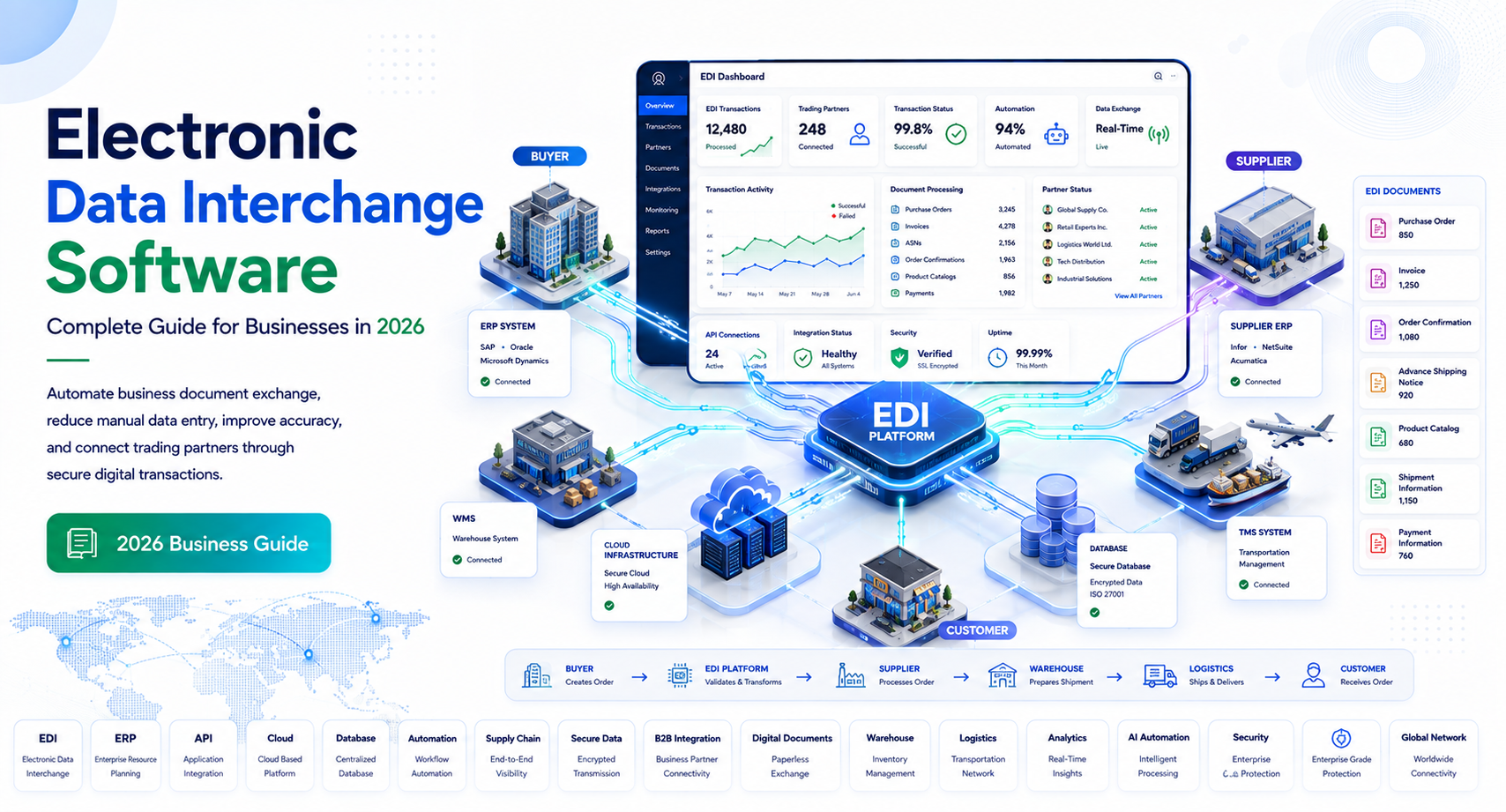
Electronic data interchange software solves this problem by automating the structured exchange of business documents between organizations and their computer systems.
Instead of an employee manually reading a purchase order and entering the information into an ERP system, EDI software can receive the document, translate it into the required format, validate the data, and send it directly into the appropriate business workflow.
For U.S. businesses working with large retailers, manufacturers, distributors, healthcare organizations, logistics providers, and government-related supply chains, EDI can be an important part of reliable B2B data exchange.
This guide explains how EDI software works, which features matter, where businesses use it, what standards and integrations you should understand, and how to evaluate the best electronic data interchange software for your organization.
What Is Electronic Data Interchange Software?
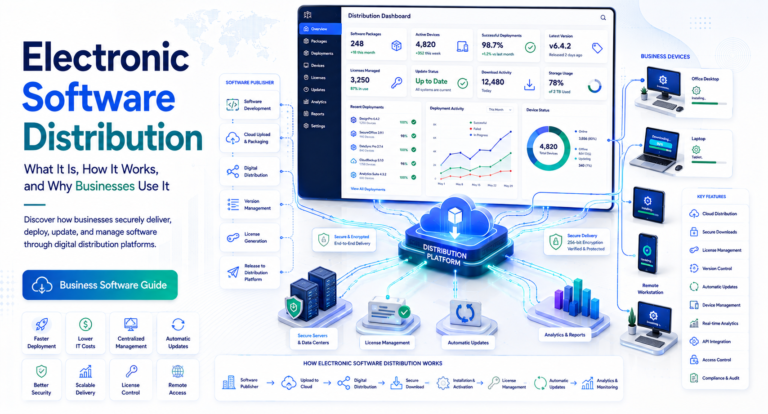
Electronic data interchange software is technology that enables businesses to exchange standardized electronic documents directly between their computer systems.
EDI replaces manual document exchange methods such as:
- Paper forms
- Fax
- Email attachments
- Spreadsheet uploads
- Manual data entry
- Web-based order portals
Common documents exchanged through EDI include:
- Purchase orders
- Invoices
- Advance shipping notices
- Purchase order acknowledgments
- Shipping instructions
- Inventory reports
- Remittance advice
- Functional acknowledgments
The software typically translates information between an organization’s internal data format and the format required by a trading partner.
For example, a retailer might send an electronic purchase order to a supplier. The supplier’s EDI platform receives the message, validates it, translates the information into a format its ERP understands, and creates the corresponding sales order.
The process can happen automatically without employees retyping the information.
EDI Software vs. Ordinary File Transfer
EDI is more structured than simply sending a CSV, PDF, or spreadsheet.
A traditional file transfer may move a document from one system to another, but EDI is designed around standardized business transactions and agreed data structures.
This distinction matters when businesses need reliable, repeatable communication across large trading networks.
How Does EDI Software Work?
Although EDI environments can become technically sophisticated, the basic process is straightforward.
1. A Business Creates a Transaction
A company generates a business document in its ERP, accounting, order management, warehouse, or procurement system.
For example, a retailer creates a purchase order for a supplier.
2. EDI Software Converts the Data
The EDI platform maps the company’s internal data fields to the structure required by the trading partner.
This is commonly called data mapping.
For example:
| Internal Data | EDI Data |
| Customer ID | Trading partner identifier |
| Product SKU | Item identification |
| Quantity | Ordered quantity |
| Unit price | Transaction price |
| Delivery date | Requested delivery date |
3. The Document Is Transmitted
The translated transaction is sent through an appropriate communication method.
Common options include:
- AS2
- SFTP
- HTTPS
- VAN services
- APIs in hybrid environments
The correct method depends on the trading partner’s technical requirements.
4. The Receiving System Processes the Transaction
The recipient’s EDI system receives and validates the document.
If the transaction passes validation, it can be converted into the recipient’s internal format and transferred into an ERP or other business application.
5. The System Sends a Response
Many EDI transactions generate acknowledgments.
For example, an EDI 997 Functional Acknowledgment can confirm that a transaction was received and syntactically processed.
This creates a more traceable communication process than ordinary email-based document exchange.
Key Features of Electronic Data Interchange Software
Not all EDI platforms provide the same level of functionality. When comparing solutions, focus on the features that match your transaction volume, trading partners, and technical environment.
Data Mapping and Translation
Mapping is one of the most important EDI capabilities.
The software should be able to transform data between internal systems and external standards without requiring excessive manual intervention.
Look for:
- Visual mapping tools
- Reusable mapping templates
- Validation rules
- Transformation logic
- Error identification
- Support for multiple document formats
Complex organizations may need highly customizable mapping capabilities.
Trading Partner Management
EDI rarely involves only two systems. A company may exchange documents with hundreds or thousands of trading partners.
A strong platform should help manage:
- Partner profiles
- Communication protocols
- Document requirements
- Partner-specific mappings
- Credentials
- Testing status
- Transaction history
Centralized partner management becomes particularly valuable as the trading network grows.
Transaction Monitoring
EDI transactions need to be visible and traceable.
Look for dashboards that show:
- Sent transactions
- Received transactions
- Processing status
- Failed documents
- Transmission errors
- Acknowledgments
- Processing timestamps
Good monitoring tools allow IT and operations teams to identify problems before they affect customers or suppliers.
Error Handling and Alerts
An EDI transaction can fail because of incorrect data, an unavailable endpoint, an expired certificate, a mapping issue, or a partner configuration problem.
Useful software should provide:
- Automated alerts
- Detailed error messages
- Retry capabilities
- Exception queues
- Transaction logs
- Notification workflows
Clear error reporting is especially important because a vague “transmission failed” message does not tell an operations team how to resolve the problem.
ERP and Business System Integration
EDI software is most useful when it connects directly to the systems where business transactions originate.
Common integrations include:
- SAP
- Oracle
- Microsoft Dynamics
- NetSuite
- QuickBooks
- Warehouse management systems
- Transportation management systems
- E-commerce platforms
- Procurement applications
API support can also help organizations connect EDI workflows with modern cloud applications.
Internal Linking Opportunity: Link to related guides such as ERP Software, Supply Chain Management Software, Procurement Software, Order Management Software, and Warehouse Management Software.
Benefits of Using EDI Software
The business case for EDI is not simply about replacing paper documents. Its larger value comes from improving the speed, consistency, and visibility of business transactions.
Reduces Manual Data Entry
When transactions move automatically between systems, employees do not need to repeatedly copy information from one application to another.
This reduces administrative work and limits opportunities for transcription errors.
Improves Transaction Accuracy
Standardized data structures and validation rules help identify missing or incorrectly formatted information before a transaction reaches the next stage.
That can reduce problems involving:
- Incorrect quantities
- Invalid product identifiers
- Missing addresses
- Incorrect purchase order numbers
- Invoice discrepancies
EDI does not eliminate every business-data error, but it can significantly improve process consistency when mappings and validation rules are properly configured.
Speeds Up Order Processing
Automated document exchange can reduce the delay between receiving an order and processing it.
This is particularly valuable for businesses handling large transaction volumes or operating time-sensitive supply chains.
Improves Supply Chain Visibility
EDI creates electronic transaction records that can help businesses understand where an order or shipment stands.
Operations teams can track events such as:
Purchase Order → Order Acknowledgment → Shipment Notice → Receipt → Invoice → Payment
This visibility helps identify bottlenecks and exceptions.
Supports Business Scalability
A manual process that works with 20 suppliers may become difficult to manage with 500.
EDI software provides automation that can support larger transaction volumes without increasing manual data-entry requirements at the same rate.
However, scalability depends on the platform’s architecture, partner onboarding process, integration capabilities, and pricing model.
Common EDI Standards You Should Know
EDI does not use one universal format. Different industries and trading networks use different standards.
ANSI X12
ANSI ASC X12 is widely used for electronic business transactions in North America.
U.S. organizations commonly encounter X12 transaction sets such as:
- EDI 850: Purchase Order
- EDI 855: Purchase Order Acknowledgment
- EDI 856: Advance Ship Notice
- EDI 810: Invoice
- EDI 846: Inventory Inquiry/Advice
- EDI 997: Functional Acknowledgment
The exact transaction sets required depend on the trading partner and business process.
EDIFACT
UN/EDIFACT is an international EDI standard used extensively outside North America.
Companies operating internationally may need software capable of supporting both X12 and EDIFACT.
Industry-Specific Requirements
Certain industries have additional EDI conventions or requirements.
Examples include:
- Retail
- Manufacturing
- Healthcare
- Transportation
- Logistics
- Automotive
When selecting software, verify the actual standards required by your trading partners rather than assuming that one standard will cover every transaction.
EDI Software for Different Industries
EDI is particularly valuable where organizations exchange high volumes of structured transactions.
Retail and E-Commerce
Retailers commonly use EDI to exchange purchase orders, invoices, shipping notices, and inventory information with suppliers.
Large retailers may also have detailed partner requirements covering document formats, testing, labels, and delivery processes.
Manufacturing
Manufacturers use EDI to coordinate purchasing, production, shipping, and supplier relationships.
Automated transactions can help connect manufacturers with suppliers and distributors.
Healthcare
Healthcare organizations may use standardized electronic transactions for areas such as eligibility verification, claims, payment information, and related administrative processes.
Healthcare EDI has specific regulatory and transaction requirements, so businesses should evaluate software based on their exact use case.
Logistics and Transportation
EDI helps shippers, carriers, brokers, and logistics providers exchange structured shipment information.
Automated communication can reduce delays caused by manually re-entering transportation data.
How to Evaluate the Best Electronic Data Interchange Software
There is no single EDI platform that is automatically best for every business.
The right choice depends on your transaction volume, industry, trading partners, existing technology, and internal technical resources.
Start With Trading Partner Requirements
Before comparing vendors, create a list of your current and planned trading partners.
Document:
- Required EDI standards
- Transaction sets
- Communication protocols
- Testing requirements
- Certification requirements
- Service-level expectations
This prevents you from choosing software that looks impressive but cannot meet your partners’ actual requirements.
Evaluate Integration Options
Determine how the EDI platform will connect to your ERP and other business systems.
Ask vendors:
- Does it support APIs?
- Does it provide prebuilt ERP connectors?
- Can mappings be customized?
- How are integration errors handled?
- Can data be synchronized automatically?
Integration quality can have a greater impact on implementation success than the number of features listed on a product page.
Consider Scalability and Total Cost
Do not evaluate pricing based only on the monthly subscription.
Consider:
- Number of transactions
- Number of trading partners
- Implementation fees
- Mapping costs
- Support charges
- Data storage
- VAN fees
- Additional connectors
- Partner onboarding costs
A platform with a lower subscription price may become more expensive if every new trading partner requires significant professional services.
EDI Security and Compliance
Because EDI transactions can contain sensitive commercial information, security should be part of the evaluation process.
Important capabilities may include:
- Encryption in transit
- Secure authentication
- Access controls
- Audit logs
- Certificate management
- Data retention controls
- Backup and disaster recovery
Organizations should also evaluate whether the provider’s security practices align with their own contractual, regulatory, and industry requirements.
For U.S. businesses, the exact compliance obligations depend on the type of data being exchanged and the industry involved. Healthcare organizations, for example, may face requirements that differ substantially from those of a general manufacturing company.
Internal Linking Opportunity: Link to related content such as B2B Integration Software, API Integration Software, Supply Chain Security, Data Security Software, and Business Process Automation Software.
Best Electronic Data Interchange Software in 2026
There is no universal “best” EDI platform. The right choice depends on transaction volume, trading partners, ERP environment, industry requirements, geographic coverage, and the level of technical support your team needs.
When evaluating vendors, it is useful to separate them into broad categories: enterprise EDI platforms, managed EDI services, and solutions designed for smaller businesses.
1. SPS Commerce
Best for: Retail, wholesale, and supplier networks
SPS Commerce focuses heavily on retail and supply chain connectivity. Its platform supports electronic transactions between suppliers and retailers and can connect with business systems used for inventory, orders, fulfillment, and financial processes.
Common capabilities include:
- Trading partner connectivity
- Order management
- Inventory data exchange
- Shipping notifications
- Invoice automation
- Retail compliance support
Why consider it: Businesses that work with multiple retailers may benefit from a platform designed around complex trading-partner requirements.
2. TrueCommerce
Best for: Businesses managing diverse trading networks
TrueCommerce provides EDI and broader supply chain connectivity capabilities for businesses that need to exchange transactions with multiple partners.
Typical capabilities include:
- EDI transaction processing
- Trading partner management
- ERP integrations
- Order management
- Inventory visibility
- B2B connectivity
Why consider it: It can be useful for organizations that want EDI capabilities alongside broader digital commerce and supply chain connectivity.
3. Cleo Integration Cloud
Best for: Organizations with complex integration requirements
Cleo provides integration capabilities that extend beyond traditional EDI. Its platform can connect EDI transactions with APIs, applications, and other data sources.
Common use cases include:
- EDI integration
- API integration
- Data transformation
- Trading partner management
- Workflow automation
- Integration monitoring
Why consider it: Businesses with hybrid environments may prefer a platform that supports EDI alongside modern application integration.
4. Boomi
Best for: Businesses connecting EDI with broader application ecosystems
Boomi is an integration platform that can connect applications, APIs, data sources, and B2B processes.
It can be considered when an organization needs more than a standalone EDI system.
Key capabilities may include:
- Application integration
- API management
- Data transformation
- B2B integration
- Workflow automation
- Cloud connectivity
Why consider it: Organizations with complex integration architectures may benefit from combining EDI with broader integration capabilities.
5. IBM Sterling
Best for: Large enterprises and complex supply chains
IBM Sterling provides enterprise-level capabilities for B2B integration and supply chain processes.
It is designed for organizations that need to manage complex transaction environments, large trading-partner networks, and sophisticated integration requirements.
Why consider it: Large organizations may need enterprise-grade governance, scalability, monitoring, and integration capabilities that go beyond basic EDI.
6. Jitterbit
Best for: Businesses seeking EDI and application integration
Jitterbit combines integration capabilities with EDI functionality, allowing businesses to connect applications and automate data flows.
It can support connections between systems such as:
- ERP platforms
- CRM applications
- E-commerce systems
- Databases
- EDI networks
Why consider it: It may be suitable for businesses that want to combine EDI with broader workflow and application integration.
Important: Product capabilities, integrations, transaction limits, and pricing can change. Before selecting an EDI provider, verify current functionality and your specific trading-partner requirements directly with the vendor.
EDI Software Pricing: What Should You Expect?
EDI pricing is more complicated than a standard SaaS subscription because costs can depend on transaction volume, partners, communication methods, integrations, and support.
Common pricing models include:
Transaction-Based Pricing
Some providers charge according to the number or type of transactions processed.
This can work well for businesses with predictable transaction volumes.
However, rapidly growing transaction volumes can increase costs, so ask vendors how overage charges are calculated.
Subscription Pricing
Some platforms charge a recurring subscription based on features, users, transaction limits, or partner connections.
This model can make budgeting easier when transaction volumes are relatively predictable.
Managed EDI Pricing
Managed EDI services may bundle software, infrastructure, monitoring, partner onboarding, and technical support into a broader service.
This can be attractive for organizations without a large internal EDI team.
Implementation Costs
Do not overlook implementation.
Potential costs include:
- ERP integration
- Data mapping
- Trading partner setup
- Testing
- Custom development
- Data migration
- Employee training
A platform that appears inexpensive during the sales process may have higher implementation costs if significant customization is required.
How to Calculate the ROI of EDI Software
The business case for EDI should be based on measurable operational improvements rather than vague productivity claims.
Start by estimating your current costs.
Manual Processing Costs
Calculate:
Annual manual processing cost = Number of transactions × Average employee processing time × Fully loaded hourly labor cost
For example, if employees manually process thousands of purchase orders every month, even a small reduction in processing time can create meaningful savings.
Error-Related Costs
Track the financial impact of:
- Incorrect orders
- Invoice discrepancies
- Shipment delays
- Duplicate entries
- Chargebacks
- Manual corrections
EDI may reduce some of these costs by standardizing data and automating validation.
Integration and Support Costs
Your ROI calculation should also include:
- Software subscription
- Implementation
- Integration maintenance
- Trading partner onboarding
- Support
- Internal administration
The goal is to compare the total cost of ownership with measurable savings and operational improvements.
EDI Implementation: A Practical Step-by-Step Process
A successful EDI implementation starts with planning rather than immediately configuring software.
Step 1: Identify Business Requirements
Document:
- Current transaction volumes
- Trading partners
- Required documents
- Existing ERP systems
- Communication protocols
- Compliance requirements
- Internal technical resources
This becomes the foundation for vendor selection.
Step 2: Prioritize Trading Partners
Do not necessarily migrate every partner at once.
Start with high-volume or strategically important partners.
A phased rollout makes it easier to identify mapping and integration issues before expanding the program.
Step 3: Map Your Business Data
Work with your EDI provider and internal application teams to map data between your ERP and the required EDI transaction format.
Pay particular attention to:
- Product identifiers
- Customer numbers
- Units of measure
- Addresses
- Pricing
- Tax information
- Shipping details
Poor mapping can create errors even when the EDI connection itself is functioning correctly.
Step 4: Test Transactions
Testing should cover normal transactions as well as exceptions.
Test scenarios such as:
- New orders
- Order changes
- Cancellations
- Partial shipments
- Backorders
- Invoice discrepancies
- Invalid data
Trading partners may have their own certification or testing procedures.
Step 5: Monitor the Initial Rollout
After going live, closely monitor:
- Transaction failures
- Acknowledgments
- Processing times
- Mapping errors
- Partner responses
- ERP integration results
Resolve recurring issues before expanding the deployment.
Common EDI Implementation Mistakes
Choosing Software Before Understanding Partner Requirements
This is one of the most expensive mistakes.
A business may select an EDI platform and later discover that a major customer requires a specific protocol, document version, or certification process.
Start with the requirements instead.
Treating EDI as an IT-Only Project
EDI affects procurement, sales, finance, warehouse operations, customer service, and logistics.
Business stakeholders should participate in implementation because they understand the processes behind each transaction.
Ignoring Exception Handling
A system that handles successful transactions well but provides poor error management can create operational headaches.
Make sure employees know:
- How errors are identified
- Who receives alerts
- How transactions are retried
- How corrections are documented
Underestimating Trading Partner Onboarding
Adding a new partner may require mapping, testing, credentials, certification, and workflow configuration.
Choose a provider with a clear onboarding process if your business expects rapid partner growth.
Focusing Only on the Software License
The software itself is only one part of the EDI environment.
Evaluate the complete cost of:
Software + Integration + Mapping + Partner Setup + Transactions + Support + Internal Administration
This provides a more realistic comparison between vendors.
EDI and the Future of B2B Integration
EDI remains important, but the technology surrounding it is changing.
EDI and APIs Will Work Together
APIs are increasingly common for real-time application connectivity, while EDI remains deeply embedded in established B2B trading relationships.
Many businesses therefore use a hybrid integration strategy rather than replacing EDI entirely.
For example:
ERP → Integration Platform → EDI Network → Trading Partner
and
ERP → API → Cloud Application
can operate within the same integration architecture.
AI-Assisted Integration Management
AI and machine learning can help identify unusual transaction patterns, classify integration errors, and assist technical teams with troubleshooting.
These capabilities should complement—not replace—proper monitoring, testing, and human oversight.
Greater Supply Chain Visibility
Organizations increasingly want transaction data to flow into centralized analytics platforms.
This can help teams identify:
- Order delays
- Supplier issues
- Inventory problems
- Fulfillment bottlenecks
- Transaction failures
EDI therefore becomes part of a broader data and supply chain visibility strategy.
Frequently Asked Questions
What is electronic data interchange software used for?
Electronic data interchange software is used to automatically exchange structured business documents between companies and their computer systems. Common transactions include purchase orders, invoices, shipping notices, and order acknowledgments.
What is the best electronic data interchange software?
The best EDI software depends on your business requirements. SPS Commerce and TrueCommerce may suit retail and supplier networks, while Cleo, Boomi, IBM Sterling, and Jitterbit may be appropriate for organizations with broader integration requirements.
Is EDI software difficult to implement?
Implementation complexity varies. A simple EDI connection can be relatively straightforward, while large multi-partner environments involving ERP integration, custom mappings, and certification can require significant planning and testing.
How much does EDI software cost?
EDI costs vary according to transaction volume, number of trading partners, integrations, implementation requirements, and support. Businesses should compare total cost of ownership rather than looking only at the software subscription.
Is EDI still relevant in 2026?
Yes. EDI remains widely used for structured B2B transactions, particularly across retail, manufacturing, logistics, healthcare, and other established supply-chain networks. Many organizations are combining EDI with APIs and modern integration platforms rather than replacing EDI completely.
May you like : Corporate Software Inspector: Complete Guide for Businesses in 2026
Conclusion
Electronic data interchange software helps businesses replace manual document exchange with automated, structured communication between internal systems and trading partners. When implemented properly, it can reduce repetitive data entry, improve transaction accuracy, accelerate order processing, and provide better visibility into B2B operations.
However, choosing an EDI platform should not begin with a list of software features. Start with your actual trading-partner requirements, transaction types, ERP environment, integration architecture, security needs, and expected growth.
When comparing the best electronic data interchange software, look beyond the subscription price. Evaluate mapping capabilities, partner onboarding, monitoring, error handling, integrations, scalability, support, and total cost of ownership.
For businesses beginning an EDI project, the most practical next step is to document your current transaction workflows and trading-partner requirements. From there, shortlist providers that can demonstrate the exact integrations and transaction scenarios your organization needs. Related resources on B2B integration software, ERP integration, supply chain management software, API integration, and business process automation can also help you build a more complete integration strategy.