Electronic Software Distribution: What It Is, How It Works, and Why Businesses Use It
Software used to arrive in boxes, on CDs, DVDs, or physical installation media. Today, most applications are delivered electronically.
A user can purchase or license software, download an installer, sign in to a cloud platform, or receive an application automatically through an organization’s IT management system. This shift has made software deployment faster and more scalable, but it has also created new challenges around security, licensing, updates, device management, and access control.
That is where electronic software distribution becomes important.
Whether you are an individual downloading an application or an IT department deploying software across thousands of computers, the underlying concept is similar: software is delivered digitally rather than through physical media.
This guide explains what electronic software distribution is, how it works, the different delivery models, its benefits and risks, and how businesses can build a more controlled software distribution process.
What Is Electronic Software Distribution?
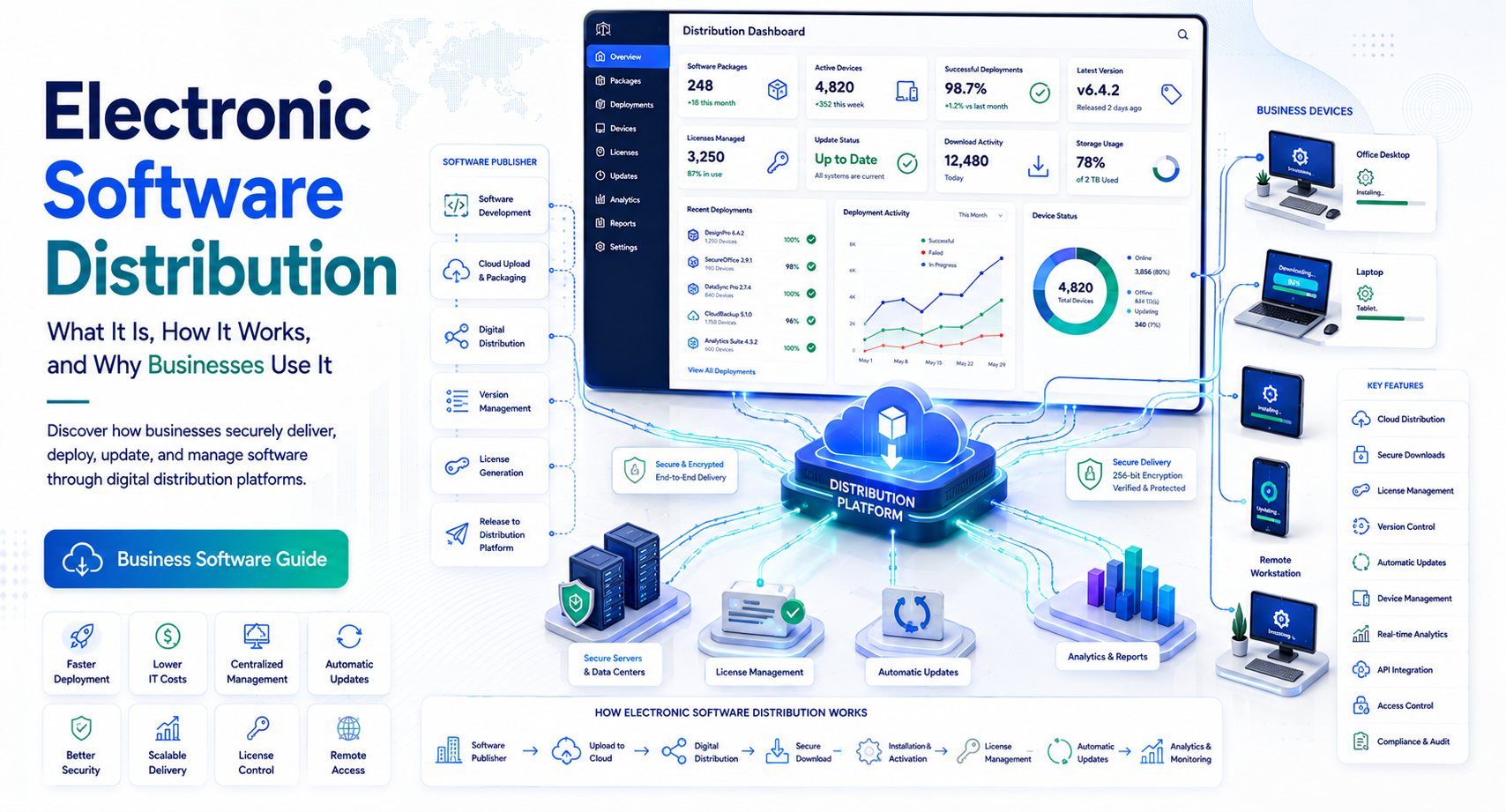
Electronic software distribution (ESD) is the digital delivery of software to users or devices without requiring physical installation media such as CDs, DVDs, or USB drives.
Software can be distributed through:
- Direct downloads
- Vendor websites
- Cloud platforms
- Application stores
- Enterprise software portals
- Device management platforms
- Software deployment tools
- Automated update systems
For example, when a company provides employees with a software application through an online company portal and the application is downloaded directly to their computers, that is a form of electronic software distribution.
What Does Electronic Software Distribution Mean?
In simple terms, electronic software distribution means:
Delivering software electronically over a network or the internet instead of distributing physical copies.
The process can be extremely simple for consumers but much more sophisticated inside an enterprise environment.
A consumer might download an application directly from a vendor.
An enterprise IT team might use centralized software deployment to install a standardized application on 5,000 managed laptops.
Both processes fall within the broader concept of electronic software distribution.
How Electronic Software Distribution Works
The exact process depends on the delivery model, but most electronic distribution workflows involve several basic stages.
1. Software Is Packaged
The software vendor prepares an application for distribution.
The package may include:
- Installation files
- Configuration settings
- Dependencies
- License information
- Digital signatures
- Update components
- Documentation
Enterprise applications may require additional packaging so they can be installed consistently across managed devices.
2. Software Is Hosted or Published
The software package is made available through a distribution channel.
Common channels include:
- Vendor websites
- Cloud storage
- App stores
- Enterprise portals
- Software repositories
- Device management systems
The distribution platform determines how users or administrators access the application.
3. The User or IT System Requests the Software
A user may manually click a download button.
In an enterprise environment, the process may be automated.
For example:
Administrator approves application → software is assigned to employees → device receives deployment instruction → application installs
This reduces the need for IT staff to manually configure every computer.
4. Software Is Downloaded and Installed
The installation package is transferred electronically to the target device.
Depending on the application, installation may be:
- Manual
- Silent
- Automated
- User-triggered
- Policy-based
Enterprise deployment tools can often install software without requiring employees to perform the installation themselves.
5. Updates Are Distributed
Electronic distribution also makes software updates easier to deliver.
A vendor can release:
- Security patches
- Bug fixes
- Feature updates
- Compatibility updates
- Performance improvements
The update can then be distributed electronically rather than sending new physical installation media.
Common Types of Electronic Software Distribution
Electronic software distribution can take several forms.
Direct Software Downloads
This is one of the simplest models.
A customer visits a vendor’s website, purchases or licenses software, and downloads the installation package.
This model is common for:
- Desktop applications
- Utilities
- Creative software
- Developer tools
- Business applications
The user generally controls when and where the software is installed.
Cloud-Based Software Distribution
Cloud software changes the traditional installation model.
Instead of downloading and installing the entire application locally, users access software through a web browser or cloud-connected application.
Software as a Service (SaaS) is a major example.
In many SaaS environments, the provider manages:
- Application hosting
- Infrastructure
- Updates
- Maintenance
- Security patches
The customer typically manages users, permissions, configuration, and data according to the service’s design.
Enterprise Software Distribution
Large organizations often need centralized control.
Enterprise software distribution allows IT teams to manage applications across many devices.
For example, an organization might have:
10,000 employees → 8,000 managed laptops → 20 approved applications
Instead of asking employees to download each application individually, IT can define approved software and distribute it through centralized management tools.
This approach improves consistency and can reduce unauthorized software installations.
Software Deployment Policies
IT administrators can establish policies such as:
- Which employees receive an application
- Which devices can install it
- Which software versions are approved
- When updates occur
- Whether users need administrator privileges
- When software should be removed
This creates a more controlled environment.
Benefits of Electronic Software Distribution
Electronic software distribution offers advantages for both software vendors and organizations.
Faster Delivery
Physical distribution requires manufacturing, packaging, shipping, and inventory management.
Digital distribution eliminates most of these steps.
A customer can receive software within minutes rather than waiting for physical delivery.
Lower Distribution Costs
Electronic delivery can reduce expenses associated with:
- Physical media
- Packaging
- Warehousing
- Shipping
- Inventory management
This is particularly valuable when software is distributed to a large customer base.
Easier Software Updates
One of the biggest advantages is the ability to distribute updates quickly.
Suppose a security vulnerability is discovered in an application.
With electronic distribution, the vendor can release a patch and make it available through the appropriate update channel.
Organizations can then deploy the patch according to their security and change-management policies.
Scalability
Electronic distribution scales much more easily than physical distribution.
A vendor can distribute the same application electronically to:
- 100 customers
- 10,000 customers
- Millions of users
The infrastructure still needs to be designed to handle demand, but physical inventory is no longer the limiting factor.
Better IT Visibility
Enterprise distribution platforms can provide information about:
- Installed applications
- Software versions
- Deployment status
- Failed installations
- Update status
- Device compliance
This visibility helps IT teams understand the organization’s software environment.
Internal Linking Opportunity: Link this section to a related guide about software asset management or software inventory management.
Electronic Software Distribution Security Risks
Digital distribution is convenient, but it introduces security considerations.
Malicious Software
Attackers can disguise malware as legitimate software.
Users who download applications from unknown sources may unknowingly install:
- Trojans
- Spyware
- Ransomware
- Credential stealers
- Other malicious programs
Organizations should therefore establish approved software sources.
Supply Chain Attacks
Software itself can become a delivery mechanism for attackers.
If a vendor’s development or distribution infrastructure is compromised, malicious code could potentially reach customers through a legitimate software update.
This is why software supply chain security has become an important consideration for enterprise IT.
Software Verification
Organizations can strengthen software distribution by using measures such as:
- Trusted repositories
- Digital signatures
- Hash verification
- Application allowlisting
- Endpoint security
- Vendor security assessments
- Controlled deployment
Users should avoid assuming that a download is safe simply because the application name appears familiar.
Software Licensing and Electronic Distribution
Electronic software distribution also changes how software licenses are managed.
A license may be based on:
- Individual users
- Devices
- Concurrent users
- Organizations
- Usage volume
- Subscription periods
For example, a company may purchase 500 licenses and distribute the application electronically to 500 authorized employees.
The distribution platform may integrate licensing controls to determine whether a user or device is authorized.
Subscription-Based Licensing
Many modern software products use subscriptions rather than permanent licenses.
The customer may pay:
- Monthly
- Annually
- Based on usage
- Based on number of users
This allows vendors to provide continuous updates while customers maintain an active subscription.
However, businesses should carefully review renewal terms, user limits, data portability, and cancellation procedures before committing.
Electronic Software Distribution for Businesses
Businesses should treat software distribution as an IT governance process rather than simply a download activity.
A controlled process might look like this:
Software request → Security review → License approval → Testing → Deployment → Monitoring → Updating → Retirement
Each stage serves a purpose.
Software Request
An employee requests an application.
Security Review
IT evaluates whether the application is safe and appropriate.
License Approval
The organization confirms that licensing requirements are satisfied.
Testing
IT tests the software for compatibility.
Deployment
The application is distributed to approved devices.
Monitoring
IT tracks installation and version status.
Updating
Security and feature updates are deployed according to policy.
Retirement
When software is no longer required, it is removed and licenses can potentially be reassigned.
This lifecycle provides considerably more control than allowing employees to install arbitrary applications.
Electronic Software Distribution and Remote Work
Remote and hybrid work have made electronic software distribution particularly important.
Employees may work from:
- Home
- Corporate offices
- Coworking spaces
- Client locations
- Multiple geographic regions
IT teams need a way to deploy and update software without physically accessing every device.
Cloud-connected device management and software deployment systems can help administrators:
- Install approved applications remotely
- Apply configuration policies
- Push updates
- Remove unauthorized software
- Monitor device status
This can make software management more practical for geographically distributed organizations.
How to Build an Effective Software Distribution Strategy
Organizations should establish clear policies before deploying software at scale.
Create an Approved Software Catalog
Maintain a list of applications that employees are allowed to use.
The catalog might classify applications as:
- Approved
- Restricted
- Under review
- Prohibited
This makes software requests easier to manage.
Standardize Software Versions
Running multiple versions of the same application can create compatibility and security problems.
Where practical, establish supported versions.
For example:
Approved application → Version 8.4 → Supported until defined retirement date
Standardization also simplifies troubleshooting.
Automate Routine Deployment
Manual installation may work for a small company, but it becomes difficult as the organization grows.
Automation can help IT teams deploy applications consistently.
Monitor Software Inventory
Organizations should know:
- What applications are installed
- Where they are installed
- Which versions are running
- Who has access
- Whether licenses are being used
This information can support both security and cost management.
Electronic Software Distribution vs. Physical Software Distribution
| Factor | Electronic Distribution | Physical Distribution |
| Delivery method | Internet/network | Physical media |
| Delivery speed | Usually fast | Slower |
| Physical inventory | Not required | Required |
| Shipping | Usually unnecessary | Required |
| Updates | Easy to distribute electronically | Often requires new media |
| Scalability | High | More limited |
| Remote deployment | Practical | Difficult |
| Centralized management | Strong | Limited |
| Internet dependency | Often required | Less dependent |
Physical software still has limited use cases, particularly in environments with restricted network connectivity or specialized operational requirements. However, electronic distribution is now the dominant model for most modern software.
Common Challenges of Electronic Software Distribution
Electronic distribution is not automatically simple.
Network Dependency
Large software packages can consume substantial bandwidth.
Organizations with slow or constrained networks may need bandwidth management or staged deployments.
Compatibility Problems
An application update may conflict with:
- Operating systems
- Drivers
- Existing applications
- Security tools
- Hardware
Testing is therefore important before large-scale deployment.
Licensing Errors
Distributing software to more users or devices than permitted can create licensing problems.
License allocation should be tracked alongside deployment.
Unauthorized Applications
If employees can freely download software, the organization may lose visibility into its software environment.
An approved software catalog and application management policies can help address this issue.
Best Practices for Electronic Software Distribution
Organizations can improve their distribution processes by following several practical principles.
Use Trusted Sources
Download and distribute software from verified vendors or approved repositories.
Verify Software Integrity
Where appropriate, validate digital signatures, checksums, or hashes.
Test Before Broad Deployment
Pilot major applications and updates with a limited group before organization-wide deployment.
Maintain Inventory
Track applications, versions, devices, and licenses.
Automate Updates
Automated patching can reduce the number of devices running outdated software, provided updates are properly tested and governed.
Establish Removal Procedures
Software management should include retirement as well as installation.
When an employee leaves or a product is discontinued, access and software should be reviewed.
Frequently Asked Questions
What is electronic software distribution?
Electronic software distribution is the digital delivery of software through the internet, a network, cloud service, application store, or enterprise deployment platform instead of physical media.
How does electronic software distribution work?
Software is packaged and made available through a digital distribution channel. A user or IT system requests the software, downloads or accesses it, and installs or runs it. Updates can then be distributed electronically through the same or a related mechanism.
What are the benefits of electronic software distribution?
The main benefits include faster delivery, lower physical distribution costs, easier updates, greater scalability, remote deployment, and improved visibility into software installations when centralized management tools are used.
Is electronic software distribution secure?
It can be secure when organizations use trusted software sources, digital signatures, security scanning, access controls, controlled deployment, and software inventory management. Unverified downloads can expose users to malware and other security risks.
What is the difference between electronic and physical software distribution?
Electronic distribution delivers software digitally through networks or the internet, while physical distribution uses media such as CDs, DVDs, or USB devices. Electronic distribution generally enables faster delivery and easier updates.
May you like : Corporate Software Inspector: Complete Guide for Businesses in 2026
Conclusion
Electronic software distribution has fundamentally changed how software reaches users. Instead of manufacturing and shipping physical media, vendors can deliver applications digitally and provide updates through online infrastructure.
For consumers, the process may be as simple as downloading an application. For businesses, however, effective software distribution involves much more: licensing, security, compatibility testing, centralized deployment, inventory management, updates, and retirement.
The most effective enterprise approach treats software distribution as part of the broader software lifecycle.
A practical process is:
Discover → Evaluate → Approve → Test → Deploy → Monitor → Update → Retire
This approach helps organizations maintain better visibility and control while reducing the risks associated with unmanaged software.
If you are evaluating your organization’s current software environment, start by creating an accurate software inventory and documenting how applications are requested, approved, deployed, updated, and removed. From there, you can identify where automation or centralized software distribution could reduce administrative work and improve security.
Internal Linking Opportunities: Consider linking this article to related guides covering software distribution tools, software asset management, software inventory management, application deployment, endpoint management, IT asset management, software licensing, and enterprise software management.